
THE BEST ANDROID APPS FOR BLOGGERS
1. WordPress
Let’s start the list with pure applications and hard to create blogs. WordPress is the most downloaded app on Google Play to create personal publishing content that allows you to design how to post the information, publish content, upload photos, check the status of your page, edit previous posts, moderate comments of others … well, do you need a blog. It is available for free.
2. Blogger
Blogger is another popular app that many bloggers use. For us, this app one of must have application for any blogspot users. It is developed by Google, and integrates seamlessly with the web tool. Create drafts to publish later upload images from gallery or directly from camera, tag your posts, change what you’ve posted in the past, controls the comments to your posts. This Blogger app is available to download for free.
3. Bloggeroid
We now can examine a couple of good customers for blogs. Maybe you have a Blogger account but do not relish the Android application. Then you must download another application as Bloggeroid, an application that gives you the ability to manage your accounts from your mobile device Blogger, putting entries, modifying, up pictures also lets you modify various accounts at the same time, you can save job.
This app is also available for Free.
4. Blogaway
Blogaway is another client for Blogger, and works similar to the previous. We recommend you to download both, because they are free, and are tested. This way you can choose the one you like or suits your way of blogging. This app is available for free.
5. Hootsuite
As important it must be for a blogger to create content as advertise them in their social networks. So it is important to have an application like Hootsuite, which allows you to manage the content of your various social networks like Twitter, Facebook, LinkedIn and Foursquare. Thus, when you publish content on your blog, you mention and advertise them in these networks easily, at the same time with a single click.
This app is also free.
6. Seesmic
Another social network administrator is Seesmic, which will help you publish your blog on Twitter or Facebook and share instantly and simultaneously contents of your blogs as photos and videos. Also it will be very useful to manage these social networks, although it has nothing to do with your blogs.
It is also free.
7. Google Analytics
If you seriously want to devote to blogging, or even do it professionally, a tool that you cannot miss is Google Analytics. It is an application that allows you to study the flow of visitors to your blogs, locating these visits by geographic area, see what inputs and what content is the most visited. In short, a set of content that will allow you to study what interests the people what you write and where you should try harder. This app is also available for free.
8. Writer
Sometimes text editor’s blogging may not be the most comfortable. In the event that this happens to be very useful to you, we recommend you to download an application such as Writer, designed only to write, write and write. Its usefulness lies in its simplicity, a clear interface and a few useful tools, so typing is easy. After the text, just copy and paste it into your blog post. This app is also absolutely free.
The Regular 10 Traveler Apps for Android
Whenever you’ve planned to go on travel, you can save your time and money with Smartphone apps. These apps will help you to get a sudden five-star hotel discount in the last moment. They even show you the fastest way to navigate. It helps you to be in touch with your family from wherever you are.
Read also: Must Install Travel Apps
Here are some of the apps that you can accomplish your needs with the best of the bunch.
1. AirBnB
AirBnB, for mobile iOS and Android system, locate over 150,000 accommodation in houses and apartments at very affordable prices. Free.
Average rating: 4.2
2. Waze
Waze, is a free browser for mobile GPS, which is chosen as the best app of 2012 at the Mobile World Congress in Barcelona. Now Waze has launched new version 3.6 with new feature that allows drivers to close on the map in real-time those streets that are blocked by obstacles, plays, parades or demonstrations and alert other drivers too. Also learns: if a driver ignores the proposed route for the browser knows a shorter or less traffic, for example, offer an alternative to the other users.
Average rating: 4.6
3. Expensify
The Expensify app is to calculate travel expenses and scan receipts. You can use Expensify on your Android device to log expenses, manage reports and capture receipt images on the go! Even better, SmartScan will read your receipt images, create a new expense, and fill out the expense details (or attach to an automatically imported.
Note: Expensify is currently not optimized for tablets.
Average rating: 4.2
4. Snapseed
Snapseed is a photo editing application for phones and computers quickly and intuitively. Features such as Drama, Grunge, Vintage, Retrolux or selective adjustment achieved spectacular effects. Compatible with Android, iPhone, Mac and Windows.
Average rating: 4.7
5. Camera Plus
Camera Plus is another effective editing tool. This allows us to play with the lighting and also features a filter that simulates HDR (High Dynamic Range). It is a technique that combines multiple photos of the same scene with different exposures.
Average rating: 4.4
6. Holoholo
Holoholo is a free application for phones and tablets from Apple and Android that allows users to live stories and adventures while touring a city (currently, Madrid) for its tourist attractions. This is a game similar to a treasure hunt, based on geolocation. The participant must solve puzzles and complete challenges related to the plot in order to access the following chapters of history with the help of sculptures and paintings that come to life on the screen of your phone using augmented reality effects.
Average rating: 5.0
7. Refund me
Refund me, a free app for iPhone, BlackBerry or Windows mobile or Android system, calculates the compensation to which you are entitled (just have to provide the flight number and incidence) form facilitates the complaint and send it to the company.
Average rating: 4.5
The 8 Best GPS Navigation Apps
GPS and other navigational devices are certainly convenient, since you can leave them in the car, docked and fully charged at all times. But nowadays it’s getting easier to just pull your smartphone and use it to show you direction.
Earlier people used compasses, star gazing for practical purposes, to ask the locations. Now this no longer happens, since smartphones we are using has a GPS app.
In this post, we want to highlight 8 best GPS navigation apps that you should install. Fundamentally, each application serves the same purpose: you choose a destination, and the application provides graphical navigation of the path, accompanying that navigation with visual and spoken cues for making turns or identifying upcoming road changes.
In no particular order, here some of the best navigation apps that you should try.
1. Google Maps
These maps are very best which turn by turn tells you where to go and even offers a route alternatively. It has awesome foreign maps available. It’s free and available forAndroid, iOS, Blackberry.
Average rating: 4.4
2. TomTom Europe
It is a very good and complete map. It has the ability to consult offline, traffic information and radar and 2D and 3D visualizations. Well, the app is very good, quality one doubted. It is available for Android and iOS.
Average rating: 3.2
3. BackCountry Navigator PRO GPS
In case your favorite activities is hiking boots and jump into hiking trails (or bike), this is definitely your app. It consists of very detailed topographic, aerial and access offline. You can plan your routes by marking the places you have to go and see what route you did, so that you can easily return the same way. There are both free and paid versions available for Android.
Average rating: 4.5
4. Sygic
This app uses TomTom maps with free updates and offline access option. It is integrated with Google, so you can search the local attractions; it regularly updates us with road issues like traffic and provides 3D visualizations. It is quite customizable and has plenty of options (navigation to your contacts or a zip code, compass, statistics and even the ability to share where you are with your friends. Available for iOS and Android phones at various prices.
Average rating: 4.1
5. Waze
Waze is a GPS navigation app for social car, which is updated in real-time by the users themselves. The community in Spain is quite wide, so that the maps work very well. It’s free and available for iOS and Android.
Average rating: 4.6
6. MapsWithMe
The main feature of these maps is that they allow you to search by category (restaurants, shops, attractions). They are designed for people who travel a lot, so they are available offline, there are maps of the entire world and, as they say, are very fast. Searches for points of interest can also be made offline; you can add favorites and program to always tell you where you are. Available for Android, iOS and Kindle.
Average rating: 4.2
7. GPS BackPackers Trails
This apps is consists of mountaineers terrain maps where you can plan routes in advance and store the routes that go by. You can also share these routes with other users, marking the points of interest you see fit. You can geotag photos and videos you take out on the way and immediately share them on social networks. Available for iOS and Android.
Average rating: 4.3
8. Mireo Do not Panic
This app will allow you to avoid the traffic in the city and is multitasking, so you can make calls or listen to music without losing navigation. It is also integrated with Foursquare, so the information on points of interest is huge and complete. You can create multi-stop routes, the maps are stored on the Smartphone and includes the “Take me home” to avoid having to enter your address every time you want to return. The different maps apps, by country, are extra. You can try a free version. Available for iOS , Android and BlackBerry.
Average rating: 4.1
5 Essential Multimedia Android Apps
Each day we discovered that we can give our Smartphone new uses. For example, these small devices have become a multimedia center to listen to music or radio, watch videos or even movies, or make and edit photos.
In this article I want to introduce five applications of android which has essential multimedia features that come standard on your mobile. And all are free.
1. Online Radio Android: TuneIn Radio
The radio tuner that comes with many Android Smartphones is very useful to hear local stations. But would not it be much better to have access to thousands of stations from around the world and the language you want?
TuneIn allows you to access more than 70,000 radio stations worldwide.
Access your favorite radio stations wherever you are. Create your list of favorite stations. And continue to do other things on your Android because the radio remains ON in the background.
And taking advantage of the program you can use it as an alarm clock and have sleep-timer (you can schedule your off).
Download it on Google Play FREE
2. Listen Music with your Android: MusicXmatch
MusicXmatch is a good music player for your Android that will allow you to view the lyrics of the song you’re listening to. If what you want is the best Android player for listening to your music, download Power amp.
MusicXmatch is a simple music player in which you can select your music by artist, album or playlist. Its great advantage is that you can view synchronized lyrics while you listen. It has the largest catalog of song lyrics.
It is compatible with other applications, such as the aforementioned Power amp, so if you decide to install it, you will see the lyrics with the plugin musicXmatch.
Download it on Google Play FREE
3. Identify Songs: SoundHound
One of the applications that can be considered amazing and everyone should have on your Android. Have you ever heard a song and identify it you would have liked to download later?
With SoundHound can identify almost any song you hear. Even if the hum is able to do it in seconds.
Very quick in identifying and if you have no internet access at the time, Sounhound save the information until you have it and can identify it.
Also looking for music by saying the name of the song or artist.
Download it on Google Play FREE
4. Videos and Movies with best quality: MX Video Player
MX Player is, in my opinion, the best video player for Android that currently exists. It is a free application (fee if you want to avoid publicity).
Forget the default application on your Smartphone to watch videos and download MX Player.
Very good performance and image quality thanks to multicore and hardware decoding. Plays all formats and streaming.
Very simple to use pinch zoom, subtitles anywhere, parental control so children cannot access other applications, etc.
Download it on Google Play FREE
5. Effects add your photos: Pixlr Express
Pixlr Express is one of the applications recommended by Google at the end of 2012. I agree with them, is one of the best photo editors that exist for our Android device.
We can tweak our photos in a pseudo profesional. You can apply up to 600 different effects.
Among other things, we can crop, resize and rotate images easily. Lighting effects, brightness, contrast, red eyes, and many more.
If you want, give us the option to add a frame to your photo.
BASIC EXCEL SKILLS
Now a days, any job requires basic Excel skills. These basic Excel skills are – familiarity with Excel ribbons & UI, ability to enter and format data, calculate totals & summaries thru formulas, highlight data that meets certain conditions, creating simple reports & charts, understanding the importance of keyboard shortcuts & productivity tricks. Based on my experience of training more than 5,000 students in various online & physical training programs, the following 6 areas form the core of basic Excel skills.
GETTING STARTED
Excel is a massive application with 1000s of features and 100s of ribbon (menu) commands. It is very easy to get lost once you open Excel. So one of the basic survival skills is to understand how to navigate Excel and access the features you are looking for.
When you open Excel, this is how it looks.
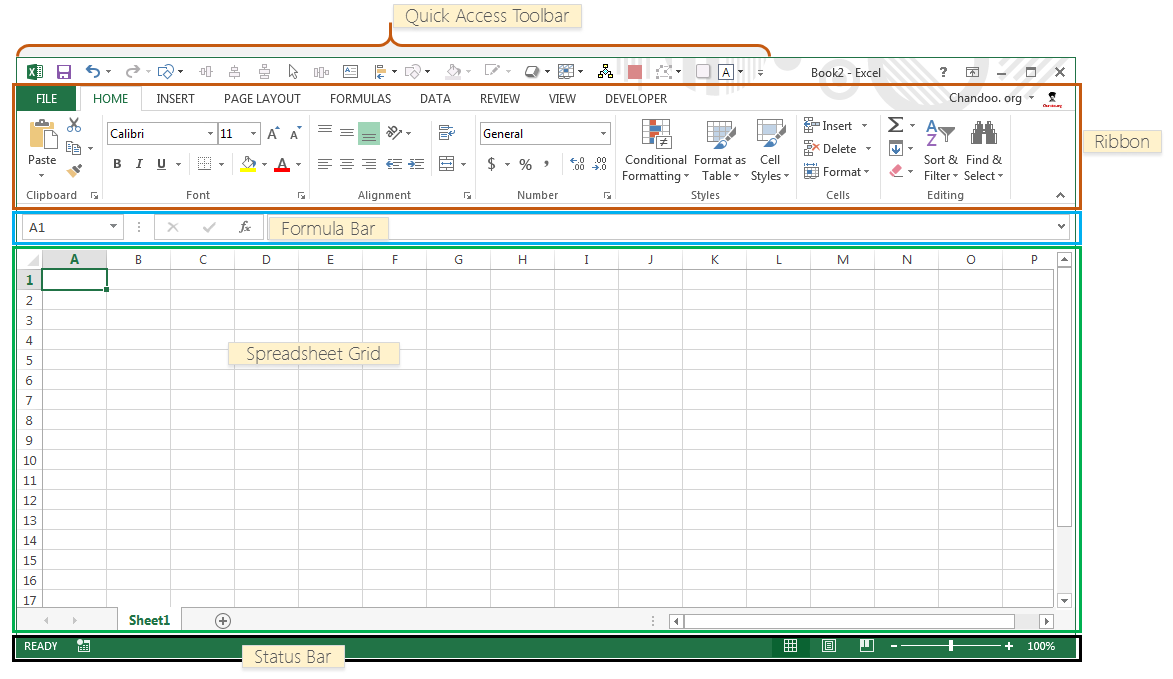
There are 5 important areas in the screen.
1. Quick Access Toolbar: This is a place where all the important tools can be placed. When you start Excel for the very first time, it has only 3 icons (Save, Undo, Redo). But you can add any feature of Excel to to Quick Access Toolbar so that you can easily access it from anywhere (hence the name).
2. Ribbon: Ribbon is like an expanded menu. It depicts all the features of Excel in easy to understand form. Since Excel has 1000s of features, they are grouped in to several ribbons. The most important ribbons are – Home, Insert, Formulas, Page Layout & Data.
3. Formula Bar: This is where any calculations or formulas you write will appear. You will understand the relevance of it once you start building formulas.
4. Spreadsheet Grid: This is where all your numbers, data, charts & drawings will go. Each Excel file can contain several sheets. But the spreadsheet grid shows few rows & columns of active spreadsheet. To see more rows or columns you can use the scroll bars to the left or at bottom. If you want to access other sheets, just click on the sheet name (or use the shortcut CTRL+Page Up or CTRL+Page Down).
5. Status bar: This tells us what is going on with Excel at any time. You can tell if Excel is busy calculating a formula, creating a pivot report or recording a macro by just looking at the status bar. The status bar also shows quick summaries of selected cells (count, sum, average, minimum or maximum values). You can change this by right clicking on it and choosing which summaries to show.<iframe width="560" height="315" src="//www.youtube.com/embed/L3-uVawPLKc" frameborder="0" allowfullscreen></iframe>
Spotify launching Top 50 charts
Returning to the Spouter-Inn from the Chapel, I found Queequeg there quite alone; he having left the Chapel before the benediction some time. He was sitting on a bench before the fire, with his feet on the stove hearth, and in one hand was holding close up to his face that little negro idol of his; peering hard into its face, and with a jack-knife gently whittling away at its nose, meanwhile humming to himself in his heathenish way.





 But being now interrupted, he put up the image; and pretty soon, going to the table, took up a large book there, and placing it on his lap began counting the pages with deliberate regularity; at every fiftieth page—as I fancied—stopping a moment, looking vacantly around him, and giving utterance to a long-drawn gurgling whistle of astonishment. He would then begin again at the next fifty; seeming to commence at number one each time, as though he could not count more than fifty, and it was only by such a large number of fifties being found together, that his astonishment at the multitude of pages was excited.
With much interest I sat watching him. Savage though he was, and hideously marred about the face—at least to my taste—his countenance yet had a something in it which was by no means disagreeable. You cannot hide the soul. Through all his unearthly tattooings, I thought I saw the traces of a simple honest heart; and in his large, deep eyes, fiery black and bold, there seemed tokens of a spirit that would dare a thousand devils. And besides all this, there was a certain lofty bearing about the Pagan, which even his uncouthness could not altogether maim. He looked like a man who had never cringed and never had had a creditor. Whether it was, too, that his head being shaved, his forehead was drawn out in freer and brighter relief, and looked more expansive than it otherwise would, this I will not venture to decide; but certain it was his head was phrenologically an excellent one. It may seem ridiculous, but it reminded me of General Washington's head, as seen in the popular busts of him. It had the same long regularly graded retreating slope from above the brows, which were likewise very projecting, like two long promontories thickly wooded on top. Queequeg was George Washington cannibalistically developed.
Whilst I was thus closely scanning him, half-pretending meanwhile to be looking out at the storm from the casement, he never heeded my presence, never troubled himself with so much as a single glance; but appeared wholly occupied with counting the pages of the marvellous book. Considering how sociably we had been sleeping together the night previous, and especially considering the affectionate arm I had found thrown over me upon waking in the morning, I thought this indifference of his very strange. But savages are strange beings; at times you do not know exactly how to take them. At first they are overawing; their calm self-collectedness of simplicity seems a Socratic wisdom. I had noticed also that Queequeg never consorted at all, or but very little, with the other seamen in the inn. He made no advances whatever; appeared to have no desire to enlarge the circle of his acquaintances. All this struck me as mighty singular; yet, upon second thoughts, there was something almost sublime in it. Here was a man some twenty thousand miles from home, by the way of Cape Horn, that is—which was the only way he could get there—thrown among people as strange to him as though he were in the planet Jupiter; and yet he seemed entirely at his ease; preserving the utmost serenity; content with his own companionship; always equal to himself. Surely this was a touch of fine philosophy; though no doubt he had never heard there was such a thing as that. But, perhaps, to be true philosophers, we mortals should not be conscious of so living or so striving. So soon as I hear that such or such a man gives himself out for a philosopher, I conclude that, like the dyspeptic old woman, he must have "broken his digester."
As I sat there in that now lonely room; the fire burning low, in that mild stage when, after its first intensity has warmed the air, it then only glows to be looked at; the evening shades and phantoms gathering round the casements, and peering in upon us silent, solitary twain; the storm booming without in solemn swells; I began to be sensible of strange feelings. I felt a melting in me. No more my splintered heart and maddened hand were turned against the wolfish world. This soothing savage had redeemed it. There he sat, his very indifference speaking a nature in which there lurked no civilized hypocrisies and bland deceits. Wild he was; a very sight of sights to see; yet I began to feel myself mysteriously drawn towards him. And those same things that would have repelled most others, they were the very magnets that thus drew me. I'll try a pagan friend, thought I, since Christian kindness has proved but hollow courtesy. I drew my bench near him, and made some friendly signs and hints, doing my best to talk with him meanwhile. At first he little noticed these advances; but presently, upon my referring to his last night's hospitalities, he made out to ask me whether we were again to be bedfellows. I told him yes; whereat I thought he looked pleased, perhaps a little complimented.
With much interest I sat watching him. Savage though he was, and hideously marred about the face—at least to my taste—his countenance yet had a something in it which was by no means disagreeable. You cannot hide the soul. Through all his unearthly tattooings, I thought I saw the traces of a simple honest heart; and in his large, deep eyes, fiery black and bold, there seemed tokens of a spirit that would dare a thousand devils. And besides all this, there was a certain lofty bearing about the Pagan, which even his uncouthness could not altogether maim. He looked like a man who had never cringed and never had had a creditor. Whether it was, too, that his head being shaved, his forehead was drawn out in freer and brighter relief, and looked more expansive than it otherwise would, this I will not venture to decide; but certain it was his head was phrenologically an excellent one. It may seem ridiculous, but it reminded me of General Washington's head, as seen in the popular busts of him. It had the same long regularly graded retreating slope from above the brows, which were likewise very projecting, like two long promontories thickly wooded on top. Queequeg was George Washington cannibalistically developed.
Whilst I was thus closely scanning him, half-pretending meanwhile to be looking out at the storm from the casement, he never heeded my presence, never troubled himself with so much as a single glance; but appeared wholly occupied with counting the pages of the marvellous book. Considering how sociably we had been sleeping together the night previous, and especially considering the affectionate arm I had found thrown over me upon waking in the morning, I thought this indifference of his very strange. But savages are strange beings; at times you do not know exactly how to take them. At first they are overawing; their calm self-collectedness of simplicity seems a Socratic wisdom. I had noticed also that Queequeg never consorted at all, or but very little, with the other seamen in the inn. He made no advances whatever; appeared to have no desire to enlarge the circle of his acquaintances. All this struck me as mighty singular; yet, upon second thoughts, there was something almost sublime in it. Here was a man some twenty thousand miles from home, by the way of Cape Horn, that is—which was the only way he could get there—thrown among people as strange to him as though he were in the planet Jupiter; and yet he seemed entirely at his ease; preserving the utmost serenity; content with his own companionship; always equal to himself. Surely this was a touch of fine philosophy; though no doubt he had never heard there was such a thing as that. But, perhaps, to be true philosophers, we mortals should not be conscious of so living or so striving. So soon as I hear that such or such a man gives himself out for a philosopher, I conclude that, like the dyspeptic old woman, he must have "broken his digester."
As I sat there in that now lonely room; the fire burning low, in that mild stage when, after its first intensity has warmed the air, it then only glows to be looked at; the evening shades and phantoms gathering round the casements, and peering in upon us silent, solitary twain; the storm booming without in solemn swells; I began to be sensible of strange feelings. I felt a melting in me. No more my splintered heart and maddened hand were turned against the wolfish world. This soothing savage had redeemed it. There he sat, his very indifference speaking a nature in which there lurked no civilized hypocrisies and bland deceits. Wild he was; a very sight of sights to see; yet I began to feel myself mysteriously drawn towards him. And those same things that would have repelled most others, they were the very magnets that thus drew me. I'll try a pagan friend, thought I, since Christian kindness has proved but hollow courtesy. I drew my bench near him, and made some friendly signs and hints, doing my best to talk with him meanwhile. At first he little noticed these advances; but presently, upon my referring to his last night's hospitalities, he made out to ask me whether we were again to be bedfellows. I told him yes; whereat I thought he looked pleased, perhaps a little complimented.
Subscribe to:
Posts (Atom)