Showing posts with label Antivirus. Show all posts

This month Giveaway Offers free 6 month Panda Internet Security protection for their new user. So, If you are looking for an enhanced Antivirus protection service, then you can try  Panda Internet Security 2016.
Panda Internet Security 2016 is a best comprehensive security suite that provides the most advanced protection against Internet threats. This Anti-Virus Software helps to protect your identity against cyber-criminals and also Provide family Safety against Internet attacks and inappropriate content.

Panda Internet Security 2016 Overview:

Panda Internet Security is considered an internet security suite, as opposed to a basic antivirus software product because it has Support lots of features such as parental controls, firewall, safe browser, network manager and email protection. It comes with useful extras such as free online backup, restoration tools, and remote PC access. It has tools for protecting your identity and contact information as well as a virtual keyboard for hiding login information from keyloggers. Panda has the technology detect suspiciously behaving websites and files. There is a tool for removing infected files from externally connected devices such as a USB drive. It can detect potentially dangerous threats attempting to migrate from within your network as well.
Panda Internet Security 2016 is a best comprehensive security suite that provides the most advanced protection against Internet threats. This Anti-Virus Software helps to protect your identity against cyber-criminals and also Provide family Safety against Internet attacks and inappropriate content.

Panda Internet Security Features List:

Maximum Protection For All Your Devices:
  • Panda Internet Security protects your PC, Mac, and Android devices, plus your iPad, iPod, and iPhone. Enjoy the best security software and browse, shop and play online with complete peace of mind.
Internet Security - Protect Your WI-FI From Intruders:
  • Panda Internet Security 2016 is designed to ensure you can enjoy your online life with complete peace of mind. It provides maximum antivirus and online fraud protection for your PC, the firewall and wi-fi protection.
Data Shield:
  • Control and safeguard access to your data, documents or any sensitive information.
  • Use the Internet without worry thanks to our Internet security suite.  The ultimate barrier against ransomware threats such as CryptoLocker.
Forget About Backup Copies Until You Need Them:
  • Say goodbye to the times when you desperately tried to recover those treasured holiday photos you had accidentally deleted.
  • Specify the files that you want to protect, and use your computer without the fear of losing valuable information.
Protect Your Family:
  • Panda Internet Security 2016 protects your family from inappropriate content (pornography, drugs, weapons, etc,). Parental control gives your kids the freedom to use the Internet, at the same time flagging any behavior you feel is inappropriate.

System Requirements For  Panda Internet Security 2016:

Minimum system requirements:
Operating System: Windows 7/8/8.1/10.
Memory(RAM): Min. 256MB required.
Hard Disk Space: Min. 240Mb Free Space Require.
Processor: Pentium 300 MHz or faster or higher.

How To Get This Promotion?

It is a Limited Period offer. click here to visit offer page and claim your Panda Internet Security 2016. [ This Promotion Valid Till 4th May 2016 ]

McAfee Internet Security is an award-winning PC protection suite that provides comprehensive, real-time protection to keep your PC safe from viruses, trojans, spyware, and malware
McAfee Internet Security is an award-winning PC protection suite that provides comprehensive, real-time protection to keep your PC safe from viruses, trojans, spyware, and malware. It might pick up from email, USB sticks, removable hard drives, or just browsing online.

McAfee Internet Security 2016 Overview:

Protect your devices from viruses, malware, and more with McAfee Internet Security 2016. This award-winning anti-virus protection works on all Windows, iOS, and Android devices. It uses facial recognition and attributes unique to you to log into your devices, online accounts, and apps. It also prevents SPAM emails from clogging your inbox.
Protect your devices from viruses, malware, and more with McAfee Internet Security 2016
McAfee Internet Security is designed to be a “set-it-and-forget-it” solution for computer security, and it fills that role quite capably with an improved user interface. With McAfee security software working in real time, security is there when you need it, invisible when you don’t. Those looking for complete protection in a simple, user-friendly interface may find this product with its antivirus, firewall, and tune-up components fill the bill.

McAfee Internet Security Features List:

Award-Winning Anti-Virus Protection:
  • Stay safe from Trojans, viruses, spyware, rootkits, and more, with state-of-the-art anti-malware protection.
  • Detects, quarantines, and blocks viruses and malware to prevent damage to your PC.
  • Keep zero-day threats and botnets at bay—McAfee Active Protection and Global Threat Intelligence technology have you covered
Parental Controls:
  • Block inappropriate sites and set time limits for Internet use
  • Set time limits on Internet usage
  • See what your kids have been up to online with a detailed usage report
Privacy and PC Optimization Tools:
  • Identifies software in need of updating by checking the version on your PC against our database using Vulnerability Scanner
  • Deletes unnecessary cookies and temporary Internet files that slow down your PC with McAfee QuickClean
  • Securely destroy sensitive files, such as tax documents, with McAfee Shredder
Wi-Fi Protection:
  • Two-Way Firewall system monitors and stops traffic in and out of your PC trying to connect to suspicious servers and known Botnets
Web Protection:
  • Helps you make smarter decisions about what you click, and protects you from malicious downloads
Network Manager:
  • Monitor your home Wi-Fi network even when you’re not home
  • Blocks unknown devices from accessing your Wi-Fi
  • Prevents others from eavesdropping on your Internet usage
Spam and Dangerous Email Filter:
  • Keeps nasty emails out of your inbox, and stops annoying junk mail from cluttering your inbox

System Requirements:

Minimum system requirements:
Operating System: Windows XP/Vista/7/8/8.1/10.
Memory(RAM): Min. 2Gb required.
Hard Disk Space: Min.500MB of free space required.
Processor: Intel Pentium IV or later.

How To Get This Promotion?

It is a Limited Period offer. Click Here To Visit Offer Page And Claim Your McAfee Internet Security 2016 For 6 Month. [ This Promotion Valid Till 6th April 2016 ]

Bitdfender Internet Security Prevent Unauthorized Access to your Private Data By Two-Way Firewall System
                 Bitdefender Internet Security 2016


  • Best Internet Security Against Cyber-Threats. Official PRODUCT OF THE YEAR.
  • Prevent Unauthorized Access to your Private Data. Two-Way Firewall.
  • Zero Performance Impact - Archived Gold Award for Fastest System Speed.
  • OneClick Security. Automatic protection, with zero questions asked.
  • Keep your Kids Safe. Monitor Their Activity. Discrete Parental Control.
a detection rate better than Norton's PC MAG

Bitdefender Internet Security 2016 Is The Best Internet Security Software For Enhanced Protection & Best Performance.

It builds on Zero Performance Impact -Achieve Gold Award For Fastest System Speed.It takes the best security decisions for your device automatically, including securing your data, online payments, and privacy, also prevents unauthorized access to your private information with a two-way Firewall and discreetly guards your children online.

List Of Bitdefender Features:

  • Zero Performance Impact:
Bitdefender's Photon™ ensures that your device runs at the same speed, even during scanning.Bitdefender Photon™ keeps Bitdefender at #1 in performance tests. This technology is developed by Bitdefender's to ensures that scanning process does not impact a device's performance, and it does this by gradually adapting to the way you use your device.
  • Easy To Use, OneClick Security:
Latest Bitdefender Internet Security Dashboard
Bitdefender keeps your devices safe and clean automatically.It silently detects and blocks all cyber-threats, without you even knowing it, thanks to its Bitdefender Autopilot™ technology. Zero configurations. Zero questions.
  • Enhanced Complete Data Protection:
New Bitdefender’s powerful technologies eliminate even the most dangerous e-threats today. Bitdefender Total Security 2016 blocks everything from traditional viruses, worms, and Trojans to ransomware, zero-day exploits, rootkits, and spyware.
  • Cloud Antispam:
Protects unwanted e-mail from reaching your Inbox, now fully based on Cloud Technology.
  • New Ransomware Protection:
Stay Protected With Bitdefender's Quick Scan Bitdefender Antivirus blocks all ransomware, even new or unknown, from encrypting and demanding a ransom on your personal files, you can manage which areas you want to protect.
  • Two-way Firewall Protection:
Bitdefender’s new Two-Way Firewall deals superior performance in pinpointing intrusions, actually filtering incoming and outgoing traffic, even connected to a Wi-Fi network.
  • Quick Vulnerability Scanner:
Check Your Device Bitdefender Vulnerabily ScannerWith a help of vulnerability scanner, you can quickly find outdated and vulnerable software, missing Windows security patches, and potentially unsafe system settings
  • Enhanced Parental Advisor:
 Blocks inappropriate content, Facebook, online games, restricts browsing, and all other Internet activities between certain hours, and also notifies you when you child attempts to bypass your rules. Also, monitors restricted areas and inform you when your child is where he is not supposed to be, via an Android app.
Enhaced Security protection avaliable on Bitdefender Internet Security
  • ENHANCED Battery Mode:
Bitdefender Internet Security 2016 maximize battery time for laptops and tablets by temporarily tweaking system settings such as a display, system cooling, system updates, Bluetooth.
  • Bitdefender Autopilot Mode:
Provides a hassle-free experience by making optimal security-related decisions with no input from you. Which means no pop-ups, no alerts, nothing to configure.
  • Enhanced Device Anti-Theft Protection:
Locks, wipes or even locates your laptop from any Internet-connected device you have at hand.

How To Install?

There are two different way to install Bitdefender Antivirus In your computer, i.e.,
Bitdefender's Online Installer: By clicking here you are automatically redirected to Bitdefender's Online Installation Guide Page.
Bitdefender's Offline Installer: By clicking here you are automatically redirected to Bitdefender's Offline Installation Guide Page.

System Requirements:

Minimum system requirements:
Operating system Require Microsoft Windows 7(SP1), Microsoft Windows 8, Microsoft Windows 8.1, Microsoft Windows 10
CPU: Require Min. Dual-Core 1.6 GHz Processor or Higher
Memory (RAM): Min. 1 GB Or Higher
Require Available free hard disk space: Min. 1 GB free space (at least 800 MB on the system drive).

new icon        BITDEFENDER INTERNET SECURITY 2016 GIVEAWAYS 6 MONTH PROMOTION (expire on 15th nov.2015) [EXPIRED]

Download Links:


Bitdefender Total Security Helps To Protect Your Device Against Cyber Threats And Anti-Malware
                Bitdefender Total Security 2016


  • The Ultimate Anti-Malware Protection Against Cyber Threats.
  • Prevent Unauthorized Access to your Private Data. Two-Way Firewall System.
  • Zero Performance Impact -Achieve Gold Award For Fastest System Speed.
  • One-Click Security. Automatic protection.
  • Device Anti-Theft Protection Available.
  • Tune Up Your Device Performance.
    Achived Gold Award For Faster System Speed With A One-Click Optimization Tools

Bitdefender Total Security Is The Best Antivirus Software For Ultimate Protection of Anti-Malware

It builds on Zero Performance Impact -Achieve Gold Award For Fastest System Speed.It takes the best security decisions for your device automatically, including securing your data, online payments, and privacy. Also, prevent from unauthorized access to your private information with a two-way Firewall and discreetly guards your children online, including a new firewall, redesigned parental controls, a one-click optimization tool and even helps to recover or block your devices in case of loss or theft.

List Of Bitdefender Features:

  • Easy To Use, OneClick Security:
Bitdefender keeps your devices safe and clean automatically.It silently detects and blocks all cyber-threats, without you even knowing it, thanks to its Bitdefender Autopilot™ technology. Zero configurations. Zero questions.
  • Bitdefender Safepay™:
Latest Bitdefender Total Security Dashboard
With Bitdefender Safepay™ make online transactions from a unique, dedicated browser that secures your accounts from fraud. It can now also automatically fill credit card details in billing fields.
  • Two-way Firewall Protection:
Bitdefender’s new Two-Way Firewall deals superior performance in pinpointing intrusions, actually filtering incoming and outgoing traffic, even connected to a Wi-Fi network.
  • Cloud Antispam:
Protects unwanted e-mail from reaching your Inbox, now fully based on Cloud Technology.
  • Enhanced Complete Data Protection:
Optimized Your Device Performance With Bitdefender One Click Optimization Tools
New Bitdefender’s powerful technologies eliminate even the most dangerous e-threats today. Bitdefender Total Security 2016 blocks everything from traditional viruses, worms, and Trojans to ransomware, zero-day exploits, rootkits, and spyware.
  • Enhanced File Encryption:
Locks on confidential files in an encrypted vault.
  • New Ransomware Protection:
Bitdefender Antivirus blocks all ransomware, even new or unknown, from encrypting and demanding a ransom on your personal files, you can manage which areas you want to protect.
  • Enhanced Parental Advisor:
Check Your Device Bitdefender Vulnerabily ScannerBlocks inappropriate content, Facebook, online games, restricts browsing, and all other Internet activities between certain hours, and also notifies you when you child attempts to bypass your rules. Also, monitors restricted areas and inform you when your child is where he is not supposed to be, via an Android app.
  • Ultimate Tune Up:
Keeps your device in shape by running a completely enhanced optimization packs, includes Registry Repair, Disk Cleanup, and a Privacy Cleanup module that makes sure you do not track online.
  • Quick Vulnerability Scanner:
With a help of vulnerability scanner, you can quickly find outdated and vulnerable software, missing Windows security patches, and potentially unsafe system settings.
  • ENHANCED Battery Mode:
Different Type Of Activities For Bitdefender Protection
Bitdefender Total Security 2016 maximize battery time for laptops and tablets by temporarily tweaking system settings such as a display, system cooling, system updates, Bluetooth.
  • Bitdefender Autopilot Mode:
Provides a hassle-free experience by making optimal security-related decisions with no input from you. Which means no pop-ups, no alerts, nothing to configure.
  • Enhanced Device Anti-Theft Protection:
Locks, wipes or even locates your laptop from any Internet-connected device you have at hand.

How To Install?

There are two different way to install Bitdefender Antivirus In your computer, i.e.,
Bitdefender's Online Installer: By clicking here you are automatically redirected to Bitdefender's Online Installation Guide Page.
Bitdefender's Offline Installer: By clicking here you are automatically redirected to Bitdefender's Offline Installation Guide Page.

System Requirements:

Minimum system requirements:
Operating system Require Microsoft Windows 7(SP1), Microsoft Windows 8, Microsoft Windows 8.1, Microsoft Windows 10
CPU: Require Min. Dual-Core 1.6 GHz Processor or Higher
Memory (RAM): Min. 1 GB Or Higher
Require Available free hard disk space: Min. 1 GB free space (at least 800 MB on the system drive)

Download Links:

Every day you hear numbers of cases of virus attack that cause to loss of precious data. In this modern age where technology is advancing with a very fast pace, you need computer daily. Thereby, it is essential for you to understand the process of computer virus removal so as to avoid such terrible unexpected intruders. Let’s have some basic knowledge of virus removal.

Common signs of virus attack are:
  • Computer running too slow
  • Unknown errors
  • Pop-ups and strange ads
  • Random PC boots
  • Blue screen error
If you find these signs then it is certain that your computer is infected with virus and you need to do computer virus removal without making much delay.
Remove virus automatically
The most common way to remove virus is the use of antivirus software. For this, you need good virus removal tool.
  1. Begin the process by closing all the applications that is running. Most of the antivirus software requires a reboot thus, it is necessary to close all the running programs.
  2. Run a scan on your computer.
  3. Detect the threats and remove them.
  4. Update your antivirus software for catching up latest threats.
  5. After updating, run the antivirus software to detect the viruses and then remove the detected items.

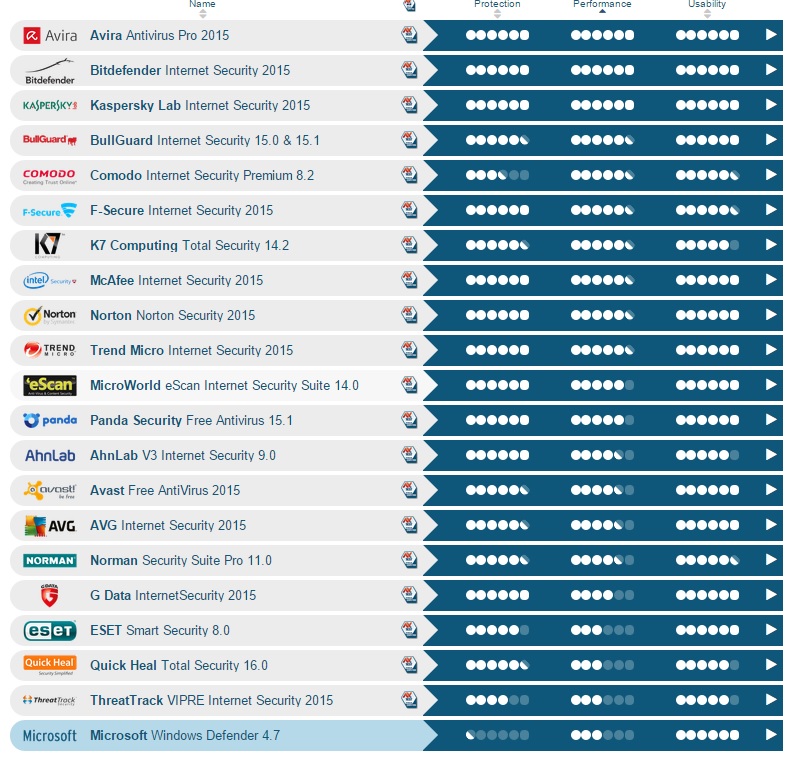
There are many free antivirus software available on internet,here is the test report for best antivirus in the market
Reference: av-test.org

Remove computer virus manually
Sometimes computer virus removal can be done manually. Try the following steps:
  1. Most of the viruses attack your PC through spyware programs and thus, you need to remove those suspicious programs. For this, start your PC in Safe Mode by pressing F8 while your PC restarts. Then click “Start” and go to “Control Panel.” Choose “Add or Remove programs.” Now, you can see all the programs installed on your computer. Find those that are linked with virus or spyware and delete them. Also, you can search online for the list of programs matching to a particular virus.
  2. By seeing the list of files related with any virus through Internet, you can check that whether any of those files are available on your computer. If you find any such file then delete them permanently.
  3. When viruses attack your PC, they add some registry entries into your system registry. You can search online for those entries and flush out those viruses that have added those entries.
It is significant to note that while removing virus manually, you should be careful regarding your needed files and entries. Make sure you are not deleting them along with doubtful files. Computer virus removal is the method that should be taken place with massive care without damaging important contents of computer.

Bitdefender Internet Security software
steps;
  1. Open the giveaway page.

  2. Fill your valid email address and the security code in the box provided. The email ID you provide here should be accessible by you, because you will get the license key for BIS at this email address.
  3. Now click the GET FREE LICENSE button and open your inbox.

  4. You will get an email from Bitdefender with the link to download the program. The email will also contain the 6 months license key to activate the product. Download the program and enter the license key when the installer asks for it.

Minimum Requirements

 Bitdefender  Security 2015 trial

  1. Bitdefender Internet Security works with Windows XP with Service Pack 3, Windows Vista with Service Pack 2, Windows 7 with Service Pack 1, and Windows 8 and 8.1

  2. It requires a minimum of 1 GB free space on your hard drive, 800 MB of which is required on the Windows installation drive.

  3. Your machine needs to have at least 1 GB of RAM installed to run Bitdefender Internet Security.

LINK: Get 180 days license for Bitdefender Internet Security 2015 for free

Now You can download Norton Antivirus 2014 both as an online or offline installer. The application you will get will already be activated with a 180 days trial. The program will ask you for your email address to add the product to your Norton account and to activate the subscription. If you already have a Norton account then you can login using that too.LINK: Online installer (537 KB) LINK: Offline installer (229 MB)

Powered by Blogger.