Showing posts with label trendshere. Show all posts

Recently there has been a big increase in websites that host auto-playing video adverts, this can be incredibly annoying if you're listening to music on your computer while browsing the web. Here we show you how to stop videos and media from auto-playing when you open a web page in Chrome

Before we start, we really need to say that you should consider your actions before you disable auto-playing video, or media adverts from websites that you regularly visit, as there is a good chance that this is main source of income, and is what ultimately funds the production of the content you wish to read. So, if you disable auto-playing videos/media make sure you support your favourite website.

How to stop auto-playing ads, videos and media in Chrome


Disabling auto-play videos and media in Chrome is simple. First of all you need to type "chrome://chrome/settings/content" into the URL bar. Then all you need to do is scroll down to the plug-in section, and select 'Let me choose when to run plugin content'.Then click Finished.

Every day you hear numbers of cases of virus attack that cause to loss of precious data. In this modern age where technology is advancing with a very fast pace, you need computer daily. Thereby, it is essential for you to understand the process of computer virus removal so as to avoid such terrible unexpected intruders. Let’s have some basic knowledge of virus removal.

Common signs of virus attack are:
  • Computer running too slow
  • Unknown errors
  • Pop-ups and strange ads
  • Random PC boots
  • Blue screen error
If you find these signs then it is certain that your computer is infected with virus and you need to do computer virus removal without making much delay.
Remove virus automatically
The most common way to remove virus is the use of antivirus software. For this, you need good virus removal tool.
  1. Begin the process by closing all the applications that is running. Most of the antivirus software requires a reboot thus, it is necessary to close all the running programs.
  2. Run a scan on your computer.
  3. Detect the threats and remove them.
  4. Update your antivirus software for catching up latest threats.
  5. After updating, run the antivirus software to detect the viruses and then remove the detected items.

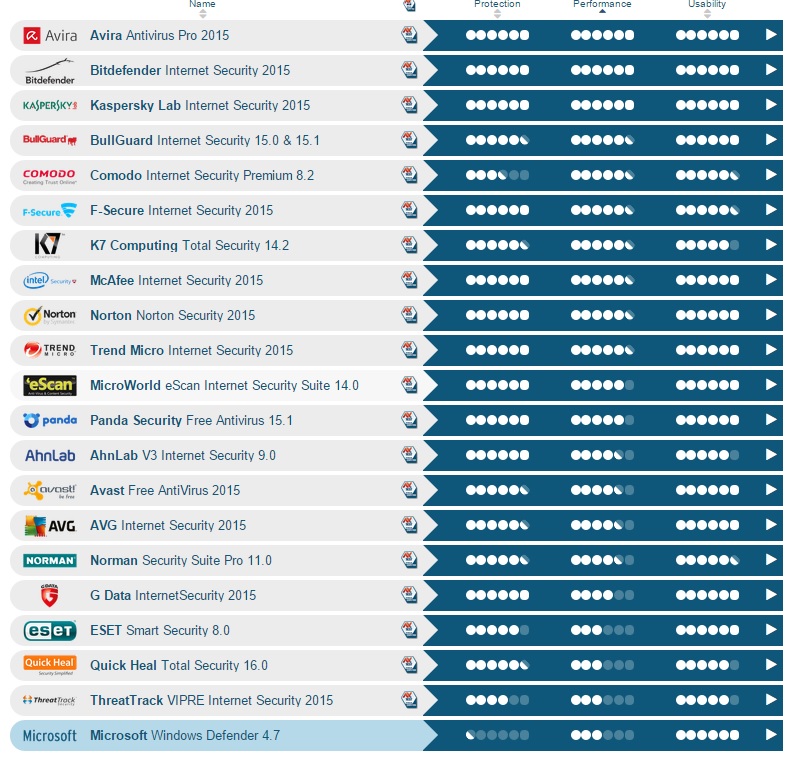
There are many free antivirus software available on internet,here is the test report for best antivirus in the market
Reference: av-test.org

Remove computer virus manually
Sometimes computer virus removal can be done manually. Try the following steps:
  1. Most of the viruses attack your PC through spyware programs and thus, you need to remove those suspicious programs. For this, start your PC in Safe Mode by pressing F8 while your PC restarts. Then click “Start” and go to “Control Panel.” Choose “Add or Remove programs.” Now, you can see all the programs installed on your computer. Find those that are linked with virus or spyware and delete them. Also, you can search online for the list of programs matching to a particular virus.
  2. By seeing the list of files related with any virus through Internet, you can check that whether any of those files are available on your computer. If you find any such file then delete them permanently.
  3. When viruses attack your PC, they add some registry entries into your system registry. You can search online for those entries and flush out those viruses that have added those entries.
It is significant to note that while removing virus manually, you should be careful regarding your needed files and entries. Make sure you are not deleting them along with doubtful files. Computer virus removal is the method that should be taken place with massive care without damaging important contents of computer.

Yes, Microsoft is losing upgrade revenue, people won’t pay to upgrade Windows 7 and 8.1 PCs to Windows 10. but
Microsoft still plans on charging for Windows licenses. When you buy a new PC, the manufacturer will still have to pay Microsoft for that license. If you build your own PC, you’ll need to pay $119 for a Windows license. Businesses will still need to pay for volume licenses — Enterprise versions of Windows 7 and 8.1 don’t get the free upgrade offer.
Windows 10 includes many of Microsoft’s applications and services. Windows 10 itself isn’t a service, but it does encourage you to pay for other things, including:
·         Windows Store Apps: Windows 10 includes the Windows Store, which sells a variety of apps. Windows 10 will expand the Windows Store to include desktop apps and allow developers to easily port iPad apps and Android apps to Windows. Even new “universal apps” now run in windows on the desktop and are more appealing than they were on Windows 8.
·         In-App Purchases: Apps from the store can include micro-transactions, also known as in-app purchases. Candy Crush Saga will even be automatically installed on Windows 10. Every time a Windows user pays for a Candy Crush micro-transaction, Microsoft will get a cut.
·         Digital Music and Videos: The Windows Store also allows you to purchase digital copies of songs, movies, and TV shows — just like iTunes. Microsoft makes some money if you buy media through their store.
·         OneDrive Storage: OneDrive is integrated into File Explorer out of the box, and Microsoft sells more OneDrive space for a monthly fee. It’s like Dropbox, Google Drive, and other similar services — but integrated directly into Windows.
·         Xbox Music Streaming: Microsoft sells an “Xbox music pass” that allows you to listen to all the music you want for a monthly fee — it’s sort of like Spotify, Apple Music, Rdio, or Google Play Music. Despite the name, this works in the Music app on Windows 10 as well as other devices, from Android to iPhone. You don’t need an Xbox.
·         Microsoft Office: Windows 10 will have a shortcut to quickly get the desktop version of Microsoft Office, and Microsoft sells an Office 365 subscription as well as boxed copies of this.
·         Skype: Windows 10 will include a shortcut to quickly get the desktop version of Skype, and Microsoft will sell you Skype minutes so you can call landline phones and cell phones from your PC.
Microsoft will probably add other services over time, too. Reports suggest “Microsoft Wi-Fi” will be an expanded and rebranded version of Skype Wi-Fi, allowing you to get online at Wi-Fi hotspots around the world with a simple payment system. The free upgrade allows Microsoft to get these services in front of many, many more Windows users all at once.

Microsoft also benefits from pulling you into their Windows ecosystem. If you like Windows 10, you might get a Windows phone to run those same “universal apps” or even just choose Microsoft’s apps on your iPhone or Android phone. You might buy a Windows tablet or PC instead of a Mac, iPad, Android tablet, or Chromebook. You might choose an Xbox One over a PlayStation 4. If you don’t like your current Windows 8.1 system so much, Microsoft is betting you’ll like Windows 10 more and that will make you happy and more likely to continue purchasing Microsoft products in the future.

NASA -camera -shows-moon- crossing -Earth
A camera on the Deep Space Climate Observatory (DSCOVR) satellite shot an arresting view of the moon crossing in front of the Earth. The image clearly shows the moon's far side lit up by the sun -- though even in full sunlight, the Earth is far brighter.
"It is surprising how much brighter Earth is than the moon," DSCOVR project scientist Adam Szabo said in a news release. "Our planet is a truly brilliant object in dark space compared to the lunar surface."

DSCOVR, which is a partnership between NASA, the National Oceanic and Atmospheric Administration and the U.S. Air Force, is equipped with NASA's Earth Polychromatic Imaging Camera, a 4-megapixel CCD camera and telescope. It's orbiting between the Earth and the sun at a distance of 1 million miles.
Though the moon's so-called dark side isn't visible from Earth -- thanks to the "tidally locked" moon always presenting the same side to its terrestrial neighbour -- It's far from the first time we've seen it.
NASA photographed the moon crossing in front of the Earth in 2008, but the moon was only partially illuminated. Moreover, those images were taken from 31 million miles away.
DSCOVR's primary role is to monitor the solar wind for NOAA, which is "critical to the accuracy and lead time of space weather alerts and forecasts," says NASA.

India’s top telecom service provider Bharti Airtel on Thursday commercially launched its fourth generation (4G) communication services, which are expected to make surfing the web on mobile phones much faster than 3G, in almost 300 towns across the country. Airtel became the first telecom company to roll out its 4G services in India.
With an aim to migrate more and more of its Internet subscribers to 4G, Airtel said users upgrading to 4G services can do so while continuing to pay as per their existing 3G data plans.
“With the help of the feedback received from the beta launches, we have now built India’s first commercial 4G network that will make high speed mobile broadband a reality.
“The national roll-out today is another small step in our journey,” Bharti Airtel (India & South Asia) MD & CEO Gopal Vittal told reporters here.
Airtel’s move comes ahead of launch of 4G services by Reliance Jio – the telecom arm of Mukesh Ambani-led Reliance Industries, towards the end of the year.
Various firm, including Airtel and Reliance Jio, had won spectrum needed to run 4G services in 2010, however, roll out of services has been slow due to technology problems and lack of devices.
While Airtel has 4G spectrum in 14 circles, Reliance Jio is the only player to have these airwaves in all the 22 circles.
Around three weeks ago, Mr. Vittal had also written to Airtel customers across the country to provide suggestions regarding tower sites, to which Mr. Vittal said the company received 20,000 responses, out of which 500 provided leads on potential sites.
Mr. Vittal said the company has increased the number of 4G mobile sites three times in the last 60 days to provide better services to customers
Mr. Vittal said Airtel is talking to various handset makers for the past one year on shaping the device ecosystem for 4G. He, however, refused to comment if the company will come with Airtel branded handsets.

Motorola has introduced a pilot project called Moto Xpress to provide after- sale services to its consumers at their doorstep in Delhi, Gurgaon and Noida. Moto Xpress is a home pick up and drop service, that will rectify software and accessory related issues, on the spot within an hour and hardware issues will be resolved within 5 working days.

The service can be availed for Rs 199 each time. “In case, an issue arises with your Motorola smartphone, you can dial our Moto Xpress Service Booking number ‘011-41717124’. As you register your request, our service staff will reach out to a trained Motorola representative who will be at your doorstep on his bike, in no time,” according to a release. Currently, Motorola has 160 service centers across the country.

Yu Televentures is all set to sell its affordable Yu Yuphoria handsets in an open sale model from today to 23 July. In anticipation of this sale which will not require any pre-registration, Yu Televentures will be keeping 100,000 handsets ready. The Yu Yuphoria phones will as usual, be sold exclusively on Amazon India.
All of these handsets will come with the ‘Made In India’ tag, taking forth the Make In India initiative, the company said in a press statement.
The Yu Yuphoria is a Rs 6,999 handset sporting the Cyanogen OS. The smartphone sports a 5-inch IPS display with 720 x 1080 pixels resolution with a layer of Corning Gorilla Glass 3. The Yu Yuphoria smartphone comes with metal frame.
It runs Android Lollipop-based Cyanogen OS 12. It comes with an app themer that allows users to customise the look and feel of the device. Also, users can expect a Truecaller integrated dialler.
The device is 8.25mm in thickness and weighs 143 grams. Under the hood, it gets a true 64-bit Qualcomm Snapdragon 410 clocked at 1.2GHz coupled with 2GB RAM. It also gets 16GB onboard storage. The dual SIM smartphone supports most sensors found in flagship devices. It also supports Bluetooth and 4G LTE.
Source <Firstpost>


Micromax owned subsidiary YU Televentures has announced that its YuFit fitness tracker wearable will be available for grabs on July 29 at a price of Rs 999 on Amazon India. Registrations for the flash sale will start on July 21 at 12PM respectively.

Also, Yu has announced that the first 1,000 customers will get free access to a coach via Healthifyme, a startup which Yu had invested in. Healthifyme subscriptions for coaches start at Rs 1,800 for two months and go up to Rs 10,000 for a year.

The YuFit features an OLED display that can track steps, track your sleep and also alert you about incoming calls and messages. The Yu Fit Band is accompanied by the YuFit app which will work with HealthifyMe service to give feedback on data collected by the band.

The new band is said to be the first calorie counter for Indian foods and also, keeps a tab on weight and fitness tracking. On fitnesss front, it gives access to group coaching, social fitness, motivation and more.

A massless particle that eluded scientists for 85 years has been discovered and it could pave the way for faster and more efficient electronics and new types of quantum computing.
An international team led by Princeton University scientists has discovered Weyl fermions theorized 85 years ago.

The researchers reported in the journal Science the first observation of Weyl fermions, which, if applied to next-generation electronics, could allow for a nearly free and efficient flow of electricity in electronics, and thus greater power, especially for computers.
Proposed by the mathematician and physicist Hermann Weyl in 1929, Weyl fermions have been long sought by scientists because they have been regarded as possible building blocks of other subatomic particles.

Their basic nature means that Weyl fermions could provide a much more stable and efficient transport of particles than electrons, which are the principle particle behind modern electronics.
Unlike electrons, Weyl fermions are massless and possess a high degree of mobility; the particle’s spin is both in the same direction as its motion – which is known as being right-handed – and in the opposite direction in which it moves, or left-handed.

“The physics of the Weyl fermion are so strange, there could be many things that arise from this particle that we’re just not capable of imagining now,” said corresponding author M Zahid Hasan, a Princeton professor of physics who led the research team.
The researchers’ find differs from the other particle discoveries in that the Weyl fermion can be reproduced and potentially applied, Hasan said.
Typically, particles such as the famous Higgs boson are detected in the fleeting aftermath of particle collisions, he said.

The Weyl fermion, however, was discovered inside a synthetic metallic crystal called tantalum arsenide that the Princeton researchers designed in collaboration with researchers at the Collaborative Innovation Center of Quantum Matter in Beijing and at National TaiwanUniversity.
The Weyl fermion possesses two characteristics that could make its discovery a boon for future electronics, including the development of the highly prized field of efficient quantum computing, Hasan said.

For a physicist, the Weyl fermions are most notable for behaving like a composite of monopole- and anti-monopole like particles when inside a crystal, Hasan said.
This means that Weyl particles that have opposite magnetic-like charges can nonetheless move independently of one another with a high degree of mobility.
The researchers also found that Weyl fermions can be used to create massless electrons that move very quickly with no backscattering, wherein electrons are lost when they collide with an obstruction. In electronics, backscattering hinders efficiency and generates heat.

Conjunctions are exciting to check out in a distinct night time sky especially when the Jupiter is just 6 degrees in the sky. You just have to get outside the house and watch west and there will be Venus and Jupiter visible clearly in the night sky.
On July 18 and 19, the crescent moon will be given company by Venus and Jupiter making it a celestial extravaganza.
The three celestial objects will be seen in a row as if they are in a divine meeting.
These three astronomical bodies, Moon, Venus and Jupiter are the second, third and fourth brightest objects respectively in our solar system after the Sun.
In fact, Venus, the second planet from the Sun, is 77 million km from Earth, and Jupiter, the fifth planet from the Sun and the solar system’s largest, is 909 million km away.
They have been gradually coming closer to each other in excess of the previous few weeks.
All the three bodies were in a triangle on Friday night and it was visible with the naked eyes. However, the phenomenon can also be watched in the daytime as well but it will vary depending on the location and time zone. They will make an appearance at 6:45 am IST on Sunday, July 19.
The moon will actually pass in front of the Venus on Monday, July 20 at 6:30 am IST, favoring the South Pacific though the rest of the world will see a stunningly close pass.

In this post we will see a simple trick or browser feature that let you convert any web page into PDF file format, which might help you to read your favorite articles offline. So lets get started.
Steps:
1. Open the Google Chrome Browser on your PC or MAC 
2. Then go to the web page that you want to convert as a PDF. 
3. Now press Ctrl+P on Windows PC or Command+P if you are on a Mac to Open the the Print dialog on Chrome Browser. 
4. Now Change the destination to “Save As PDF” and hit the save button.
5. The current web page will instantly be downloaded as a PDF document. 


This is the way to Shut-down your Friends Computer just By Sending a File To Them through e-mail or any other communication tool,Here are the Steps

  • Create a new file on Notepad
  • Paste the below code on the file
  • And Save it as "Anything.BAT" in All Files . 


        @echo off
        msg * I don't like you
        shutdown -c "Error! You are too stupid!" -s


With multiple Wi-Fi access points saved on your Android device, it is quite normal to forget the security key to a certain network. This article presents a small, handy work-around for the rare instance where you need to view a forgotten password.

This method requires your device to have root access. If it doesn’t, type “root < device name>” in the search bar a Android root guides to see if your device is listed there or not, and if it is, how to gain root access on it.
Also, you’ll need a file explorer that gives you read access to root-level documents. Root Explorer ,File Manager HD or ES File Explorer includes said feature.
  • Navigate to the root directory /data/misc/wifi. If your file explorer opens the SD card (/mnt/sdcard) directory by default, press back twice to open the root directory, then navigate to the mentioned path.
  • Open the document wpa_supplicant.conf. If you’re using Root Explorer, simply tap the file to open it in a text viewer or hold it (long tap) to open its context menu and select View as text to do the same.
  • From within said file, you can view all your saved Wi-Fi access points along with their passwords. Look under the SSID (Access Point Name) of the Wi-Fi network whose password you need to view. The password is written within quotes in the line that says psk=”password”


August 30, 2019
37th Anniversary of E-mail

The credit goes to an Indian-American VA Shiva Ayyadurai who received official recognition as the inventor of the computer program for electronic mail system from the US government August 30, 1982.

Studying at Livingston High School in New Jersey, Ayyadurai began his work on the email system for the University of Medicine and Dentistry of New Jersey.
In 1978, he developed a full-scale emulation of the interoffice mail system which he called "E-mail" and copyrighted in 1982.
At that time, copyright was the equivalent of a patent as there was no other way to protect software inventions, Huffington Post reported.
Based on his work, Ayyadurai won a Westinghouse Science Talent Search Award for high school seniors in 1981.
The official US copyright notice for "E-mail" is now with the Smithsonian Institution National Museum of American History (SINMAH).
However, the claims Ayyadurai made for the invention led to controversy over his place in the history of computer technology, with some other people claiming to have invented email.

Know who is the inventor of email? The credit goes to an Indian-American VA Shiva Ayyadurai who received official recognition as the inventor of the computer program for electronic mail system from the US government August 30, 1982.

Studying at Livingston High School in New Jersey, Ayyadurai began his work on the email system for the University of Medicine and Dentistry of New Jersey.
In 1978, he developed a full-scale emulation of the interoffice mail system which he called "E-mail" and copyrighted in 1982.
At that time, copyright was the equivalent of a patent as there was no other way to protect software inventions, Huffington Post reported.
Based on his work, Ayyadurai won a Westinghouse Science Talent Search Award for high school seniors in 1981.
The official US copyright notice for "E-mail" is now with the Smithsonian Institution National Museum of American History (SINMAH).
However, the claims Ayyadurai made for the invention led to controversy over his place in the history of computer technology, with some other people claiming to have invented email.

Consumer health care is poised to become much more integrated with our day-to-day lives thanks to the recent advances in mobile apps, devices and wearable tech. Home blood pressure monitors have been quite a breakthrough where consumer health technology is concerned, offering people the freedom of checking hypertension in the comfort of their homes. Here are some of the best home blood pressure monitors in the market and information on how they stack up against one another.

Omron BP786
Omron is one of the most prolific home blood pressure monitor brands in the market today. This is one of the first names that most doctors recommend to those patients who are considering buying their own BP monitor. Omron may have a bulky design, but it is a reliable device that does everything it claims to.

The BP786 monitor is the latest device to be launched by the company. It retails at $80 and can be hooked up to a mobile device or a computer. There are apps available that allow the monitor to interact with the devices, but many users have reported certain problems with the Android app.

The best part of this device is that it can be used independently of any computerized gadget, which makes it particularly popular with older customers who aren't tech-savvy. It has a simply and user-friendly interface. To take a reading, one has to attach the cuff to one's upper arm and hit the blue button. The machine displays your blood pressure, some stats on your pulse and also identifies irregular heartbeats. Up to 100 readings per person can be stored in the device.

Microlife WatchBP home A
It can be said that Microlife is one of the most critically acclaimed consumer BP monitor brands today. The Microlife WatchBP home A may not be the sleekest looking machine on the market, but is a handy device to monitor the health of those patients suffering from atrial fibrillation. This is a standalone device, much like the Omron. The WatchBP does not supper mobile devices, but has its own software that allows users to analyze their readings on a computer. The software is presented to users old-school style, on a 3" CD-ROM.

As compared to other home monitors that offer general blood pressure monitoring, the WatchBP home has been marketed specifically as a device which is to be used along with the monitoring of a physician to detect atrial fibrillation.

There are two modes on the device - Usual and Diagnostic. The Usual mode is used for more ad hoc readings as and when the user needs, while the Diagnostic mode is meant to be used under instruction from a physician.

The only place that this device seems to fall short when compared to the Omron, is the arm cuff, which is difficult to self-apply.

QardioArm Blood Pressure Monitor
The QardioArm Blood Pressure Monitor has a minimalistic, sophisticated, and elegant design and is totally wearable. It can be called 'a true blood pressure monitor for the iPhone age'. The QardioArm is only compatible with iOS and cannot be used as a standalone device, unlike the Omron and Microlife devices. This means that users who don't have an iPad or an iPhone cannot use this device.

Apple owner must first download the Qardio app from the getqardio.com website or from the App store before they are able to use the monitor. There are many great customer reviews, but a glowing error that is hard to miss is that app is sometimes not available on the App Store and the link to the Qardio app on the company's own website did not work. The QardioArm retails at $99 and has been developed through an Indiegogo crowdfunding drive.

iHealth Wireless Blood Pressure Monitors
The iHealth BP monitors, like the QardioArm, are being targeted towards Apple users. This device offers no Android support and requires an Apple device and app to function. The iHealth "MyVitals" app can be found on the Apple store and is easily installed.

With most wrist BP monitors, the readings tend to be less accurate and higher than those that are taken at the arm. This is due to the fact that arteries at the wrist are not do deep and are narrower. Since wrist-mounted BP monitors are much more sensitive to the position of one's body, the user has to position their wrist and arm at heart level to get an accurate reading. But even then, readings tend to be inaccurate.

Usually people who go into for a wrist BP monitor only do so if they have problems taking blood pressure measurements from their upper arm. This could be if they find BP measurements painful or have a very large arm.

This device has an inbuilt sensor which the app uses to guide the user into angling their arm into the correct position. It is user-friendly, stylish and well-designed. The MyVitals app allows users to track not only their blood pressure, but also their weight, sleep data, calorie trends, food intake, physical activity and more. This app therefore allows users to manage just about all aspects of their general health.

When you're riding a bike, the world is an endless barrage of obstacles, hazards, and other vehicles sharing the road you need to avoid. Mirrors let you keep an eye on what's going on behind your cycle, but the Backtracker promises to spot vehicles up to 450 feet away using radar, and warn you to get out of the way when they're approaching a little too fast.


The system actually uses two devices strapped to your bike that work in unison. The radar transmitter mounts to the back of your seat and provides an additional visual warning to drivers that intensifies the closer they get. And an LED indicator mounts to the bike's handlebars, providing a visual indication of how fast a vehicle is approaching from behind, and a warning if the rider needs to get out of the way just to be safe.
The Backtracker's creators have turned to crowdfunding to help raise the $226,000 needed to put their device into production. And if successful, they expect it to retail for around $200 when it hits stores.
But that depends on many factors, including demand. Is this something cyclists really need when a quick turn of the head, or a glance at a mirror, can provide a similar heads up? And can the device really be effective when you're on a windy road, or already fighting your way through dense traffic? What do you think? [Backtracker via Outside]

Even carrying your iPhone's charger everywhere you go doesn't guarantee you'll be able to keep your phone running all day. Sometimes outlets can be hard to find, and for those times the NomadPlus is here to help-transforming your iPhone's standard charger into a portable 1,500 mAh battery for back power on-the-go.
Shipping in late November for just $39, the NomadPlus simply requires you to insert the compact AC adapter that came with your recent-generation iPhone, immediately giving you a portable charging solution with enough power to bring a dead smartphone about 70 percent of the way back to life.

When plugged into a wall it charges a connected device first, and then itself. So come morning your smartphone is ready to tackle the day, and then the evening on top of that, even if you can't get access to an outlet. [Nomad]

Google's plans for its Nexus brand are always the topic of speculation and rumour, not least because of Mountain View's lack of a pattern that makes things hard to predict.
Case in point: sources say Google may actually release not one, but two new Nexus smartphones this year alongside the rumoured Nexus 9 tablet.
That's according to Phone Arena, which also revealed the potential Google one-two product punch hinges on how well Motorola's Moto X+1 performs, oddly enough.
Apparently the Moto X+1's performance will determine which version of the rumoured Moto S Motorola releases, and that in turn will influence Google's Nexus plans, the site's sources said.

Triple threat

You see, Motorola is reportedly testing both a 5.2- and a 5.9-inch version of the Moto S, and which one it releases may be based on Moto X+1 sales.
The Moto X+1 is rumoured to be a 5.2-inch smartphone, but if that proves too small for today's phablet-gorged phone users then Motorola will opt for the larger, 5.9-inch Moto S as its next device.
Then, and here's the point, Google may scoop up the 5.2-inch design and brand it as a Nexus device, to go along with the rumoured 5.9-inch Nexus X, which is already said to be almost identical to the Moto S of the same size.
Obviously there are a lot of ifs here and a chart may be helpful to follow along, but at the same time this seems totally plausible.

Google already confirmed there's at least one new Nexus device coming this year, but we won't be surprised if there are actually more.

Powered by Blogger.