Showing posts with label app. Show all posts


 In today’s fast-paced world, enhancing productivity is a priority for professionals, students, and entrepreneurs alike. With technology at our fingertips, productivity apps have become indispensable tools for managing time, tasks, and goals efficiently. Here, we present a meticulously curated list of the top 10 productivity apps to help you organize, plan, and achieve success.


1. Todoist: Streamline Your Task Management

Todoist stands out as one of the most versatile task management tools available. With its intuitive interface and robust features, it allows users to:

  • Create, organize, and prioritize tasks.
  • Set deadlines and reminders.
  • Collaborate on projects with team members.

The app integrates seamlessly with platforms like Gmail, Slack, and Google Calendar, making it a favorite for professionals who juggle multiple responsibilities.


2. Trello: Visual Project Management Simplified

Trello’s Kanban-style boards make project management visually appealing and highly functional. Users can:

  • Break down projects into boards, lists, and cards.
  • Attach files, set due dates, and track progress.
  • Integrate the app with tools like Jira, Confluence, and Slack.

Its simplicity and visual workflow make it ideal for teams managing creative and collaborative projects.


3. Notion: All-in-One Workspace

Notion offers unparalleled flexibility as a note-taking, collaboration, and project management tool. With Notion, you can:

  • Create databases, calendars, and task lists.
  • Write and organize detailed notes.
  • Share workspaces with teammates for seamless collaboration.

Its customization options cater to both individuals and teams looking for a unified solution to manage diverse projects.


4. Evernote: Your Digital Notebook

For those who value note-taking and organization, Evernote is an essential tool. This app allows you to:

  • Save notes, to-do lists, and web clippings.
  • Sync content across devices for easy access.
  • Organize ideas using tags and notebooks.

Evernote’s OCR feature even lets you search for text within images, ensuring nothing gets lost in your workflow.


5. Microsoft OneNote: Powerful and Free Note-Taking

Microsoft OneNote is a feature-rich note-taking app that integrates seamlessly with the Microsoft ecosystem. Key features include:

  • Organizing notes in notebooks, sections, and pages.
  • Drawing or annotating with a stylus.
  • Collaborating on shared notebooks with colleagues.

Best of all, OneNote is free and accessible across multiple devices.


6. Asana: Advanced Team Collaboration

Asana simplifies task and project management for teams with its user-friendly design and advanced features. It helps teams:

  • Create tasks and assign them to members.
  • Visualize workflows with boards, timelines, and calendars.
  • Track project progress to meet deadlines efficiently.

Its integration with third-party tools like Dropbox, Zoom, and Adobe Creative Cloud enhances productivity for diverse industries.


7. Google Calendar: Time Management Mastery

Google Calendar is a must-have tool for managing schedules effectively. It empowers users to:

  • Plan and organize events with ease.
  • Set reminders and receive notifications.
  • Share calendars with colleagues and family.

The app’s integration with Gmail and other Google Workspace tools ensures you never miss an important meeting or deadline.


8. Forest: Focus and Time Management

Forest is a unique app that encourages users to stay focused and reduce distractions. Its standout features include:

  • Planting virtual trees that grow as you focus.
  • Unlocking rewards and building virtual forests.
  • Offering a gamified approach to time management.

The app’s eco-friendly twist—where users can plant real trees—is an added incentive for staying productive.


9. Zoom: Revolutionizing Remote Work

Zoom has become synonymous with virtual meetings and remote collaboration. Its features cater to professionals who value efficient communication:

  • Host HD video meetings with screen sharing.
  • Record sessions for future reference.
  • Collaborate via breakout rooms and chat.

Its scalability and reliability make it a top choice for teams of all sizes.


10. Slack: Streamlined Communication for Teams

Slack redefines team communication with its versatile platform, enabling users to:

  • Create channels for specific projects or topics.
  • Share files, links, and updates in real time.
  • Integrate with over 2,000 apps, including Google Drive and Trello.

Its customizable notifications and search functionality ensure teams remain connected without unnecessary distractions.


How to Choose the Best Productivity App for Your Needs

Selecting the right app depends on your goals and work style. Consider factors such as:

  • Functionality: Does the app meet your specific needs?
  • Ease of Use: Is the interface intuitive and user-friendly?
  • Integration: Can it connect with tools you already use?
  • Pricing: Does the app fit within your budget?

Testing a few apps from this list can help you identify the best fit for your productivity goals.


Conclusion

The right productivity app can transform how you manage tasks, collaborate with others, and achieve your objectives. Whether you’re looking for a simple to-do list manager like Todoist or an all-in-one workspace like Notion, this list offers solutions tailored to diverse productivity needs. Start exploring these apps today to take your efficiency to the next level!

Microsoft_create_ iOS_ and_ Android_ apps_ with_ Windows

At Build 2017, Microsoft showed off the cross-platform power of its .NET framework, by demonstrating how apps could be easily created on a Windows PC and work on iOS, Android, and Windows all through a single shared code base.
But Microsoft didn’t stop there. While the .NET Standard 2.0 code base allows apps to share code, the original XAML libraries for building user interfaces weren’t cross compatible. So, Microsoft also announced XAML Standard 1.0, a unified markup language for user interface elements that works across Windows, iOS, and Android.
Or, in simpler terms — Microsoft now has a shared code library that allows developers to easily create apps for all three platforms with the same user interface with a minimal amount of effort. Which can only be a good thing for everyone, regardless of the OS you prefer.


Additionally, Microsoft announced functionality for developing iOS apps directly from a Windows PC using a new tool called the Xamarin Live Player. It’s an iOS application that developers can pair with Visual Studio and deploy code to an iOS device, while still maintaining the same debugging utilities of Visual Studio. Developers will also be able to use the same live editing tools from Visual Studio in iOS developement.

What is a Hybrid Mobile App?

Hybrid mobile apps are like any other apps you’ll find on your phone. They install on your device. You can find them in app stores. With them, you can play games, engage your friends through social media, take photos, track your health, and much more.
Like the websites on the internet, hybrid mobile apps are built with a combination of web technologies like HTML, CSS, and JavaScript. The key difference is that hybrid apps are hosted inside a native application that utilizes a mobile platform’s WebView. (You can think of the WebView as a chromeless browser window that’s typically configured to run fullscreen.) This enables them to access device capabilities such as the accelerometer, camera, contacts, and more. These are capabilities that are often restricted to access from inside mobile browsers. Furthermore, hybrid mobile apps can include native UI elements in situations where necessary, as evidenced by Basecamp’s approach towards hybrid mobile app development.
It can be very difficult to tell how a mobile application is built. Hybrid mobile applications are no different. A well-written hybrid app shouldn’t look or behave any differently than its native equivalent. More importantly, users don’t care either way. They simply want an application that works well. Trying to figure out if a mobile application is hybrid or native is like trying to differentiate rare grape varieties of wine. Unless you’re a sommelier or someone who really cares about it, it’s not terribly important. What matters is that the wine tastes good. The same can be said for hybrid mobile applications; so long as the application does what it’s supposed to do, who really cares how it was built?
The time has never been better to learn mobile application development. For many app ideas, you don’t even need any prior native development knowledge. You can get started today with knowledge of HTML, CSS and JavaScript. Unlike native mobile development, mobile applications using web technologies can support many mobile platforms.
There are many tools and framework available to help you create Mobile applications. In this article, we’ll look at our Top 14

IONIC

Ion Screenshot
IONIC is one of the most promising HTML 5 mobile application frameworks. Built using SASS, it provides many UI components to help develop rich and interactive apps. It uses the JavaScript MVVM framework, AngularJS to power apps. Two-way data binding, interaction with backend services and APIs makes AngularJS a mobile developer’s common choice. With the coming release of AngularJS 2.0, focused on mobile, it’s sure to gain even more popularity.
The team at IONIC will soon be introducing an easier way to create IONIC apps with IONIC creator. This will be released soon and will have drag and drop functionality to get started with app development in minutes.
www.sitepoint.com have published several articles on Ionic, including getting started with mobile app development and getting started with firefox os game development.

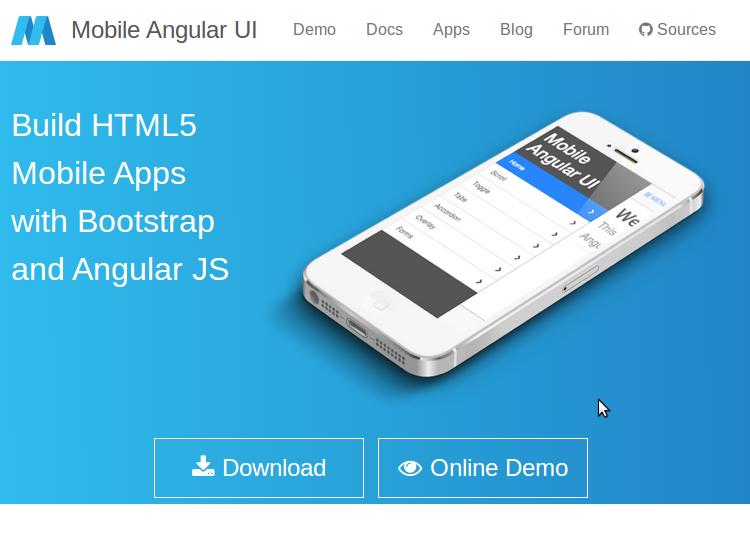
Mobile Angular UI

Mobile Angular UI
Mobile Angular UI is an HTML 5 framework which uses bootstrap 3 and AngularJS to create interactive mobile apps.
The main features of Mobile AngularUI include:
  • Bootstrap 3
  • AngularJS
  • Bootstrap 3 mobile components such as switches, overlays and sidebars which are missing in normal bootstrap.
  • AngularJS modules such as angular-route, angular-touch and angular-animate
Responsive media queries are stripped out of bootstrap as separate files, you only need to include what you need. Mobile Angular UI doesn’t have any jQuery dependencies, all you need are some AngularJS directives to create awesome mobile user experiences.
Take a look at the Mobile Angular UI demo page to see it in action. If you want to dig deeper, I would recommend reading our article on getting started with Mobile Angular UI.

Intel XDK

Intel XDK
Intel XDK is a cross platform application tool developed by Intel. Getting started with Intel XDK is easy, all you need is to download their application which is free and available for Linux, Windows and Mac. It provides a number of templates to get started and supports a number of UI frameworks such as Twitter bootstrap, jQuery Mobile and Topcoat.
Intel XDK provides a live preview on the connected device whilst you are developing along side many other useful tools.
On a personal note, I think development using Intel XDK was the easiest. It uses a drag and drop approach, although it does create a lot of unnecessary code.
Sitepoint’s -Introduction to Intel XDK is a great tutorial to get started developing with the platform.

Appcelerator Titanium

Titanium
Appcelerator’s Titanium is an open source mobile application framework that provides an environment to create native apps for several mobile platforms
Titanium is a complete solution for creating hybrid mobile apps with all you need in one place. To get started with Titanium download Titanium studio. The Titanium SDK is equipped with a number of mobile platform APIs and Cloud service to use as an app backend. It comes with platform independent APIs which makes it easier to access phone hardware.
Titanium uses Alloy, a MVC framework to enable rapid development of mobile apps. Modules created using Alloy are easy to reuse across different apps, hence significantly reducing the development time and the lines of code.
Titanium studio comes with some code samples to get started and we hope to have a tutorial on SitePoint soon.

Sencha Touch

Sencha Touch
Sencha Touch is an HTML 5 mobile app framework for creating apps for several platforms including iOS, Android and Blackberry. It has been in existence for some years now and is popular among hybrid mobile application developers.
Sencha Touch scores highly against it’s competitors by providing a native look and feel across all of the platforms it supports.
Getting started with Sencha Touch isn’t that difficult but in order to get the best out of Sencha Touch, one needs to invest a considerable amount of time.
To get a feel of a Sencha Touch app, take a look at the samples provided on its official page. To get started developing using Sencha, read their official docs or our introductory tutorial from last year.

Kendo UI

Telerik’s Kendo UI is an HTML 5 framework for creating cross platform mobile applications. Kendo UI relies heavily on jQuery and has a number of jQuery based widgets.
Learning Kendo UI is not difficult, developers familiar with jQuery will find Kendo UI easy to learn. Kendo UI has open sourced most of Kendo UI’s toolset and JavaScript framework features. However most of the commonly used widgets are still under a commercial license.
To get started developing with Kendo UI, refer to the official documentation. They also have a number of video tutorials to help learn the framework.

PhoneGap

PhoneGap
PhoneGap is the odd one out in this list as it’s not a framework for creating an app, but for packaging and releasing an app. PhoneGap is based on the open source Cordova and is the commercial version owned by Adobe. With a dedicated support team, PhoneGap is popular amongst many mobile developers.
You can use any choice of JavaScript or UI frameworks to get started with PhoneGap. jQuery Mobile alongside KnockOut.jsor AngularJS is a nice combination. Once you are done with your code, PhoneGap takes it from there and wraps it based on the intended platform. Applications built using PhoneGap use a web view to render their content. PhoneGap has a minimal set of web APIs to access phone hardware features and it’s possible to write custom plugins to suit requirements.
Refer to the PhoneGap documentation to get started, (sitepoint.com)-.or Building a currency converter using PhoneGap is a good starting point.

Framework 7


Framework 7 leads the race among hybrid app frameworks in iOS mobile apps development space.

The main advantage of Framework 7 is that it empowers developers to build iOS and Android apps with just CSS, JavaScript and HTML, the technology that web developers already know. Framework 7 is so close to native iOS apps that it even provides features like swipe back, out of the box. There are many other ready to use UI elements including list views, media lists, side panels, modals etc., that can be used as is without the need to get into JavaScript.

Framework 7 is completely free and open source under MIT license. You can read more about Framework 7 at its official website - Framework7.

JQuery Mobile


jQuery suite is still in the game and holding the ground tight against the feature rich hybrid mobile app development frameworks like Ionic, Onsen UI and Framework 7. The die-hard jQuey fans community has built this minimalist jQuery Mobile package on top of solid jQueyr and jQuery UI foundation.

The focus of jQuery mobile is to empower developers to build web apps and mobile apps that run seamlessly and with unique user experience across mobiles, tablets and desktops. It doesn't focus much on providing native look and feel to apps for individual platforms like iOS or Android.

You can read more on jQuery Mobile at  - jquerymobile.com.

Mobile Angular UI


This one is for the fans of Bootstrap and Angular. With Mobile Angular UI, you get best of both Bootstrap 3 and Angular framework to build HTML5 mobile applications. Angular UI is more like an extension to Bootstrap 3 but without any dependencies to bootstrap js or jQuery. It utilizes fastclick.js and overthrow.js for smooth and better mobile experience.

Mobile Angular UI provides directives for building UI component like overlays, switches, sidebars, scrollable areas and absolute positioned navbars that don’t bounce on scroll. These essentially are the components that you find missing in Bootstrap 3 for building mobile apps.

Mobile Angular UI is available as open source and free to use under MIT license, you can get the source code at github - mobile-angular-ui.

Read more about Mobile Angular UI at official website- mobileangularui.com.

Famo.us


Famo.us is another powerhouse html5 apps development framework and targets to provide near native experience in hybrid apps. The main difference between famo.us and other hybrid html5 frameworks is that it focuses more on graphics rendering, 2d and 3d and hence is more suitable for games development.

Read more about Famo.us at official website - famous.org.

Monaca


Monaca is another commercial mobile app development platform with a huge list of products for managing end to end app development life cycle. Monaca features a cloud based IDE for developing hybrid mobile apps and lets you compile and publish to multiple platforms, utilizing Cordova.

The range of modules and products that Monaca offers is huge and i prefer to cover that in a separate article, keep watching for that and until then read more about Monaca at the official website - monaca.io.

Trigger.IO - The Dark Horse


I have already covered 10 of the best mobile app development frameworks but am finding it a little difficult to leave Trigger.io out from this list. Trigger.io takes a different approach and doesn't utilize Cordova for native access.

Trigger.io has its own platform for bridging the gap between html5 development and native access. They claim (Though I am still in the process of validating it) that it produces hybrid applications that have much better performance than Cordova based applications.

Trigger.io uses Forge JavaScript API for access to native functions like accelerometer and camera etc. Keep an eye on Trigger.io and read more about it at its official website - trigger.io.

App.js


app.js is a JavaScript library for creating mobile web apps. It’s lightweight and unlike other frameworks, doesn’t use AngularJS. It provides several custom themes and widgets. You can write the app using zepto or jQuery. A good starting point is An intro to App.js.

Conclusion

In this article, we discussed some of the best HTML 5 mobile app development frameworks. HTML 5 mobile development is evolving day by day and there are always new options emerging. What have been your favorite frameworks to use when developing a mobile app?

google_new_product_launch

Today's Google event was dedicated to how its new hardware and software will blend together. Google started off with an official Pixel phone unveiling, after weeks of rumors and leaks.


That kicked off a focus on software, especially the way Google's new Assistant software will power the Pixel and Pixel XL smartphones and Google Home. Google also showcased its Daydream View, a cozy-looking VR headset covered in fabric. The new 4K Chromecast Ultra made an appearance, as did Google's modular Wi-Fi router system, and Google Home, the AI-powered speaker aimed at Amazon's Echo. We've got the details below, along with full coverage of
Google's hardware event right here.

 Google Pixel and Pixel XL


Google Pixel and Pixel XL
After weeks of leaks, Google unveiled what we were all expecting: the Pixel and Pixel XL smartphones. Both have a similar design and are differentiated mainly by the size of their screens. Google's Pixel includes a 5-inch 1080p display, and the XL features a larger 5.5-inch Quad HD panel. Both devices are built by HTC and are powered by the latest Snapdragon 821 processor, 4GB of RAM, and 32GB or 128GB of storage.
Google has included fingerprint sensors on the rear, and both Pixel smartphones run a specialized version of Google's Android software, which includes support for the Daydream virtual reality headsets and Google's new Assistant software. Google's new Assistant is a key part of the Pixel and of Google's keynote in general, and the search giant took a lot of time demonstrating what the Assistant can do, from answering traditional search queries to reaching into apps to make restaurant reservations or play music.
Google also focused on photography with the Pixel, boasting that DXOMark scored the Pixel camera 89, the highest ever for a smartphone. Google is providing free unlimited storage for Pixel owners so you can store full-resolution pictures and videos on Google Photos. Both Pixel devices will ship with the latest Android Nougat release, and updates will be available immediately. Pricing starts at $649 for the smaller 5-inch Pixel, available for preorder today. Google is also giving out promo codes for Daydream Views with Pixel preorders.
Daydream View headset

Daydream View headset
Google unveiled its first headset for the Daydream VR platform today: Daydream View. Compatible with any Daydream-supported phone, the new lightweight headset has been designed to be "soft and cozy," thanks to the fact it's made from the type of fabric you'd find in clothing. Google has worked with clothing designers to perfect the design, but apart from the fabric it looks like a regular VR headset. Google has crafted an area on the headset to hide the remote control away, and it slots neatly into the front of the device.
Like the Pixel unveil, Google spent a lot of time focusing on the software aspects of the Daydream View. There's Google Street View, YouTube, and Google Photos apps that are controlled from the remote. Naturally, you can watch 360 VR videos with the YouTube app, and explore around streets with a click of a button. Daydream View and the controller will go on sale in November for $79.
Chromecast Ultra

Chromecast Ultra
Chromecast got an upgrade with Ultra, a version that supports HDR, Dolby Vision, and 4K content. The basics of the Ultra are largely the same as its predecessors — a disc you plug into your TV — but it now has an Ethernet port integrated into the power adapter. It’s also more expensive, at $69. You can preorder the Ultra in November, and it ships in December. Google Play movies will also start streaming 4K content in November.
Google Wifi

Google Wifi
After last year’s foray into router partnerships with OnHub, Google is now making routers itself. The new system, called simply Google Wifi, is a multi-point network similar to Eero, letting you place modular router points throughout your house for maximum coverage. The system manages your connection as you move through the house, optimizing which router you're connected to. You can also actively manage the network through the app — including, in the demo, the ability to kick your kids of the internet by pressing "pause." A single router costs $129, while a three-pack costs $299. Preorders start in November and it ships in December.
Google Home

Google Home
Google Home goes on sale next month for $129. Google announced its smart home assistant at I/O in May, but today Google Home finally got a price and a release date. Home will ship on November 4th and cost $129, with a three-pack for $299. That's a very deliberate shot at the Amazon Echo (currently going for $179), and given Google's new smart assistant features, it will be interesting to see how the two products stack up. Home is also designed to work with multiple units in a single house, although the team is still working on support for multiple Google accounts. It also comes with a free six-month trial of YouTube Red.
-theverge.
Powered by Blogger.