From cars and trucks to planes and trains, brakes work in a similar way on most different vehicles. There are even brakes in wind turbines! Here's a quick comparison of some common brake systems.
Bicycle
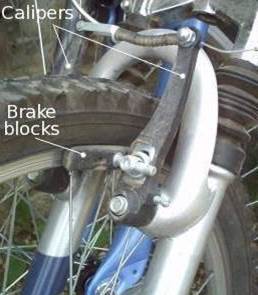
If you ride a bicycle, you know all about brakes. If you want to stop suddenly, you squeeze the brake levers on the handlebars. Thin metal cables running to the back and front wheels pull on small calipers, forcing thick rubber blocks to press against the wheels. As they do so, friction between the blocks and the metal wheel rims generates heat, reducing your kinetic energy, and bringing you safely to a stop.
Although most bicycles still use caliper brakes, some use disc or drum brakes instead (described below).
A closeup of bicycle brake blocks
Motorcycle
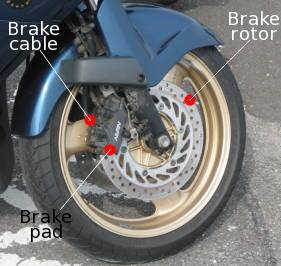
Motorcycles typically have disc brakes comprising a rotor and a brake pad. The rotor is a disc with holes (or slots) in it mounted on the side of the wheel. A brake pad, operated by a hydraulic cable, jams against the rotor to slow it down by friction. The holes in the rotor help to dissipate the heat generated.
Motorcycle brake rotor, brake block, and cable
Steam locomotive
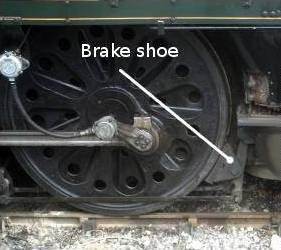
The brakes on a steam locomotive work the same way as a car's and are even more obvious. You can see the brake just behind the wheel in this photo. It clamps against the locomotive's driving wheels to slow them down. Since there are no tires on the wheels, the friction that stops the train comes from the immense weight of the locomotive pressing the metal wheels down onto the track.
A closeup of a steam engine wheel with the brake shoe
Airplane
Airplanes have brakes inside their wheels to help bring them to a stop on the runway, but they can also use air brakes to increase drag (air resistance) and slow themselves down—a bit like parachutes. Jet fighters often have a speed brake, which is a large metal plate just behind the cockpit that can be hydraulically raised to increase drag and braking.
An F-15E Strike Eagle jet fighter airplane raises its aerodynamic speed brake to slow down as it comes into land.
Wind turbine
Wind turbines have brakes to stop their rotors (propellers) turning too quickly. The brake is mounted inside the nacelle (the square-shaped casing behind the propeller that contains the gearbox and generator). Most turbines have an anemometer on them to measure the wind-speed. If it rises above a safe level, the brakes come on automatically and bring the rotors to a standstill. It's a shame, because higher wind speeds mean more energy could be produced. But safety always comes first!
Wind turbine brake
A closer look at car brakes
Most cars have two or three different types of braking systems.
Disc brakes
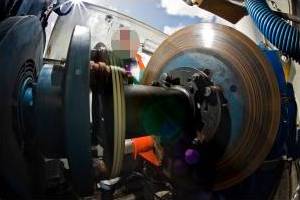
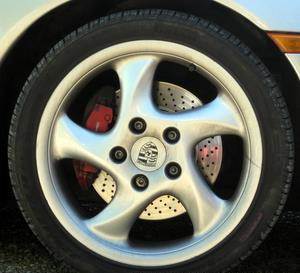
Peer through the hubcap of a car's front wheels and you can usually see a shiny metal disc just inside. This is called a disc brake. When the driver steps on the brake pedal, a pad of hard-wearing material clamps onto the brake disc and rubs it to make it slow down—in a similar way to bicycle brakes.
A closeup of a Porsche sports car front wheel showing the brake disk behind
Drum brakes
Some cars have disc brakes on all four wheels, but many have drum brakes on the back wheels, which work in a slightly different way. Instead of the disc and brake block, they have shoes inside the hollow wheel hub that press outwards. As the shoes push into the wheel, friction slows you down.
Simple animation showing how drum brakes work.
Handbrake
A car's handbrake applies the two rear brakes (disc or drum) in a slower, less forceful way through a lever that's typically located between the front seats. When you pull on the brake, a system of levers tugs on a pair of sturdy cables that apply the brakes to the back wheels. The handbrake system is completely mechanical and, unlike the conventional pedal brakes, doesn't use hydraulic fluid. That means it can be used (with very great care!) as an emergency braking system if the normal brakes fail.

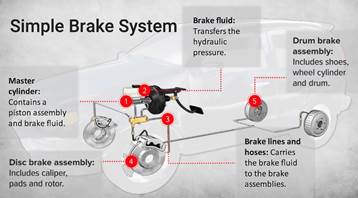
Image result for brake system
We all know that pushing down on the brake pedal slows a car to a stop. But how does this happen? How does your car transmit the force from your leg to its wheels? How does it multiply the force so that it is enough to stop something as big as a car?
The layout of a typical brake system
When you depress your brake pedal, your car transmits the force from your foot to its brakes through a fluid. Since the actual brakes require a much greater force than you could apply with your leg, your car must also multiply the force of your foot. It does this in two ways:
·         Mechanical advantage (leverage)
·         Hydraulic force multiplication
The brakes transmit the force to the tires using friction, and the tires transmit that force to the road using friction as well.
Before we begin our discussion on the components of the brake system, we'll cover these three principles:
·         Leverage
·         Hydraulics
·         Friction

Leverage and Hydraulics
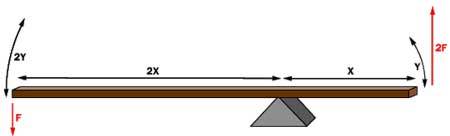
The pedal is designed in such a way that it can multiply the force from your leg several times before any force is even transmitted to the brake fluid.
In the fi­gure above, a force F is being applied to the left end of the lever. The left end of the lever is twice as long (2X) as the right end (X). Therefore, on the right end of the lever a force of 2F is available, but it acts through half of the distance (Y) that the left end moves (2Y). Changing the relative lengths of the left and right ends of the lever changes the multipliers.
The basic idea behind any hydraulic system is very simple: Force applied at one point is transmitted to another point using an incompressible fluid, almost always an oil of some sort. Most brake systems also multiply the force in the process.

Simple hydraulic system

In the figure above, two pistons (shown in red) are fit into two glass cylinders filled with oil (shown in light blue) and connected to one another with an oil-filled pipe. If you apply a downward force to one piston (the left one, in this drawing), then the force is transmitted to the second piston through the oil in the pipe. Since oil is incompressible, the efficiency is very good -- almost all of the applied force appears at the second piston. The great thing about hydraulic systems is that the pipe connecting the two cylinders can be any length and shape, allowing it to snake through all sorts of things separating the two pistons. The pipe can also fork, so that one master cylinder can drive more than one slave cylinder if desired.

Master cylinder with two slaves

The other neat thing about a hydraulic system is that it makes force multiplication (or division) fairly easy. In a hydraulic system, all you have to do is change the size of one piston and cylinder relative to the other.

Hydraulic multiplication

To determine the multiplication factor in the figure above, start by looking at the size of the pistons. Assume that the piston on the left is 2 inches (5.08 cm) in diameter (1-inch / 2.54 cm radius), while the piston on the right is 6 inches (15.24 cm) in diameter (3-inch / 7.62 cm radius). The area of the two pistons is Pi * r2. The area of the left piston is therefore 3.14, while the area of the piston on the right is 28.26. The piston on the right is nine times larger than the piston on the left. This means that any force applied to the left-hand piston will come out nine times greater on the right-hand piston. So, if you apply a 100-pound downward force to the left piston, a 900-pound upward force will appear on the right. The only catch is that you will have to depress the left piston 9 inches (22.86 cm) to raise the right piston 1 inch (2.54 cm).
Friction
Friction is a measure of how hard it is to slide one object over another. Take a look at the figure below. Both of the blocks are made from the same material, but one is heavier. I think we all know which one will be harder for the bulldozer to push.
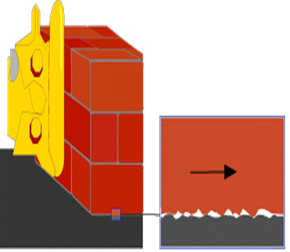
To understand why this is, let's take a close look at one of the blocks and the table:

Friction force versus weight

https://cdn.hswstatic.com/gif/brake-friction2.gif
Because friction exists at the microscopic level, the amount of force it takes to move a given block is proportional to that block's weight.
Even though the blocks look smooth to the naked eye, they are actually quite rough at the microscopic level. When you set the block down on the table, the little peaks and valleys get squished together, and some of them may actually weld together. The weight of the heavier block causes it to squish together more, so it is even harder to slide.
Different materials have different microscopic structures; for instance, it is harder to slide rubber against rubber than it is to slide steel against steel. The type of material determines the coefficient of friction, the ratio of the force required to slide the block to the block's weight. If the coefficient were 1.0 in our example, then it would take 100 pounds of force to slide the 100-pound (45 kg) block, or 400 pounds (180 kg) of force to slide the 400-pound block. If the coefficient were 0.1, then it would take 10 pounds of force to slide to the 100-pound block or 40 pounds of force to slide the 400-pound block.
So the amount of force it takes to move a given block is proportional to that block's weight. The more weight, the more force required. This concept applies for devices like brakes and clutches, where a pad is pressed against a spinning disc. The more force that presses on the pad, the greater the stopping force.


Image result for 3d printing business
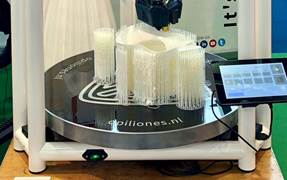
If you have some detailed sketches for a robot prototype, customized eyewear, or designer toy, 3D printing lets you turn these ideas into tangible creations. Opening your own 3D printing operation could be the way to fuse your technical and artistic skills and turn them into a profit.
Here’s what you’ll need to get your 3D printing business off the ground.

1.Software

There’s a lot of great free open-source software out there. You might be able to rely on online shareware to complete your first few projects. However, as your business grows you’ll want to invest in at least a year-one license for 3D modeling software with 3D printing features.
According to Micallef, some of the 3D-specific workflows of modeling tools that you should look for in software include checking printer models for 3D output, the ability to properly orient models on the print bed, and support generation, which ensures the model remains stable during the printing process.
2.Thermoplastic filament
Materials are an essential part of building your 3D creations. Spend some time thinking about how important strength, durability, and level of detail are to what you’ll be building. Note that there’s usually a tradeoff between strength and durability.
You’ll want to choose a material that is sturdy, versatile, and compatible with your printer. A popular material is thermoplastic filament, with polylactic acid (PLA) and acrylonitrile butadiene styrene (ABS) as the most common types. The filament comes in a wide assortment of colors in spools, usually in 1.75mm or 3mm thickness. A spool yields roughly 400 chess pieces.

3.Materials sample kit

If you’re still mulling over what kind of material you’ll want to use to build your creations, you can test out a few options before committing. Besides thermoplastic, you can also make 3D creations from sandstone, metals, and ceramics. Printing with non-plastic materials is considered experimental, so bear in mind that you may get mixed results.

4.3D printer

While outsourcing your creations to a third-party 3D printing vendor is an option, you’ll be able to turn projects around more quickly with an in-house printer. There are quite a few to choose from. Here are some questions to ask yourself in your search:
What’s your expected volume of print runs?
3D printing takes time. If you’re going to be making a high volume of one type of design and want to speed up production, be sure to look for printers that are known to have a faster processing speed.
What is the scale of the objects you want to build?
If you’re printing smaller items, entry-level fused deposition manufacturing (FDM) printers can produce objects that are roughly 4” all around. For creations that are larger, you’ll want to invest in a high-end filament printer, which can print objects that are about 10” x 6” x 6”.
What type of material will you primarily be using?
Although the majority of 3D printing is created with plastic, there are a few printers with the capacity to build an object using other materials.
What is the level of detail of your creations?
If your objects have minimal details, then the majority of printers will suit your needs. If your creations require a high level of detail, then consider purchasing a stereolithographic (SL) printer. This type of printer uses a photosensitive resin and UV laser to produce objects that have a high resolution.

5.Training

Invest in yourself and your business by taking a 3D animation course. You can take classes online or through a visual effects tech school if there’s one in your area. Perhaps there’s an area you feel you could improve in, such as modelling or texture, or you just want to stay up to date with 3D animation technology. Regardless, practicing these skills in a learning environment will only help your business evolve.


Image result for 3d printing business
If you have some detailed sketches for a robot prototype, customized eyewear, or designer toy, 3D printing lets you turn these ideas into tangible creations. Opening your own 3D printing operation could be the way to fuse your technical and artistic skills and turn them into a profit.
Here’s what you’ll need to get your 3D printing business off the ground.

1.Software

There’s a lot of great free open-source software out there. You might be able to rely on online shareware to complete your first few projects. However, as your business grows you’ll want to invest in at least a year-one license for 3D modeling software with 3D printing features.
According to Micallef, some of the 3D-specific workflows of modeling tools that you should look for in software include checking printer models for 3D output, the ability to properly orient models on the print bed, and support generation, which ensures the model remains stable during the printing process.
2.Thermoplastic filament
Materials are an essential part of building your 3D creations. Spend some time thinking about how important strength, durability, and level of detail are to what you’ll be building. Note that there’s usually a tradeoff between strength and durability.
You’ll want to choose a material that is sturdy, versatile, and compatible with your printer. A popular material is thermoplastic filament, with polylactic acid (PLA) and acrylonitrile butadiene styrene (ABS) as the most common types. The filament comes in a wide assortment of colors in spools, usually in 1.75mm or 3mm thickness. A spool yields roughly 400 chess pieces.

3.Materials sample kit

If you’re still mulling over what kind of material you’ll want to use to build your creations, you can test out a few options before committing. Besides thermoplastic, you can also make 3D creations from sandstone, metals, and ceramics. Printing with non-plastic materials is considered experimental, so bear in mind that you may get mixed results.

4.3D printer

While outsourcing your creations to a third-party 3D printing vendor is an option, you’ll be able to turn projects around more quickly with an in-house printer. There are quite a few to choose from. Here are some questions to ask yourself in your search:
What’s your expected volume of print runs?
3D printing takes time. If you’re going to be making a high volume of one type of design and want to speed up production, be sure to look for printers that are known to have a faster processing speed.
What is the scale of the objects you want to build?
If you’re printing smaller items, entry-level fused deposition manufacturing (FDM) printers can produce objects that are roughly 4” all around. For creations that are larger, you’ll want to invest in a high-end filament printer, which can print objects that are about 10” x 6” x 6”.
What type of material will you primarily be using?
Although the majority of 3D printing is created with plastic, there are a few printers with the capacity to build an object using other materials.
What is the level of detail of your creations?
If your objects have minimal details, then the majority of printers will suit your needs. If your creations require a high level of detail, then consider purchasing a stereolithographic (SL) printer. This type of printer uses a photosensitive resin and UV laser to produce objects that have a high resolution.

5.Training

Invest in yourself and your business by taking a 3D animation course. You can take classes online or through a visual effects tech school if there’s one in your area. Perhaps there’s an area you feel you could improve in, such as modelling or texture, or you just want to stay up to date with 3D animation technology. Regardless, practicing these skills in a learning environment will only help your business evolve.

1.The first Lamborghini didn't even have an engine when they unveiled it.
https://blogger.googleusercontent.com/img/b/R29vZ2xl/AVvXsEgjanZRd-DgjkfH2DxYIqrry-NUCX-i4WG-3yOsjDQ2yLsc7-8VvInqnR1U_XDnGUyrRRouUSi_tcq4iAlPqi1ggrfEFNOO1VQY-MwQCWw-g4eImUcaGb-iHaa60F4YlU52EWpmFkb5EDQ/s320/lamborghini.jpg

The 350 GTV may have been the world's first Lambo, and ultimately, it led to the creation of the supercar genre, but when it was first unveiled at the Turin Auto Show it wasn't even finished, so they put a bunch of bricks where the engine should have been and kept the hood shut the entire time.

2.The Four Rings in the AUDI Logo represent the FOUR companies of  AUTO UNION
https://blogger.googleusercontent.com/img/b/R29vZ2xl/AVvXsEhLSOE5V1pcJnUdi5ZWSZ4qzgsVxZNgD_xpU5xjcWaJssNj5RjzZ6zpQZB96QET6kYTgp2I4GJo0vU8jnOJTxbyEzU1SbmVhLWIBvSI8QR3u9zPyRscq6ez8kRMXYS4DCvIJxvyAUqkVTY/s320/THE+FOUR+RINGS+IN+THE+LOGO+REPRESENT+THE+FOUR+COMPANIES+OF+AUTO+UNION.jpg

By 1932, the name fiasco between Horch the man, and Horch the company was water under the bridge. Horch (the company) and Audi entered an agreement along with two other German car manufacturers, DKW and Wanderer, to form Auto Union. The four rings, which Audi still uses today, originally represented the four companies of Auto Union.

3.Ferrari Engines are Musically Engineered

https://blogger.googleusercontent.com/img/b/R29vZ2xl/AVvXsEgDaqFpj5Ey39vJYYk46hyphenhyphenVFWs7l675XrLP8XyinuhXRRUF-C83ZApLihR4HWJj2STi7zttmDjhl0ZXmbH_wRK2NMV8dYHAqKm7bD5DzOST2adgjtJaCUkKlGNkKaofa1vg0BqmQ4UTIRQ/s1600/ferrari.jpg

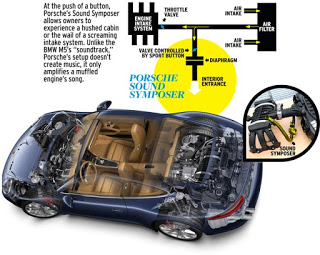
Ferrari engines are musically engineered to sound perfect by utilizing 3rd and 6th harmonics on the air intake, like an organ or flute.

4.Most new cars fake engine noise through speakers. They are quite silent otherwise.
https://blogger.googleusercontent.com/img/b/R29vZ2xl/AVvXsEjkHyshYqeimliKcXL1Y-TzmPwRn8IMqZkNxjR3s61cQvG-JFRJHZVNLlPr3EocolsM2Ahfb4SPX4mzNjs3Jp1CW7d11_BXM3wZreIzAaIVnWlmTbcih75APELXEvcq2qfgvg8QBLjmOMU/s320/faking-it-engine-sound-enhancement-explained-inline-photo-449284-s-original.jpg

5.LAMBORGHINI Cars were a result of a Tractor Company Owner being insulted by the founder of  FERRARI
https://blogger.googleusercontent.com/img/b/R29vZ2xl/AVvXsEhalzVzZ9ajKhTLTN2sEGZDw8cW-4wHirY2-9Xe1JMLyQW6EOG9vNxwpJWjjzZpKBUhkJeAtYss4gt550U7G9heeNx17chGKudDNZd-QzhH8LTRrz51LDBPrcqpNiavwJ0CsMrqQDFsH6k/s320/Ferruccio_Lamborghini.jpg

Ferruccio famously owned a Ferrari 250GT, which he took in to be serviced at the Maranello headquarters after realizing that the clutch was identical to the one being used on his production line. He politely asked Enzo Ferrari for a replacement part, who replied "You're just a silly tractor manufacturer, how could you possibly know anything about sports cars?" Like any red-blooded Italian, he spit on the floor, walked out and started designing his own sports car. Four months later he unveiled the Lamborghini 350GTV.

6.Royal Enfield logo

https://blogger.googleusercontent.com/img/b/R29vZ2xl/AVvXsEjZUpARoC69pKLlCJVWuYZwdQrfpzl1B99ukyeOMn5bLKvt_kfbEY26OD62QZ8XYHNYY8zHglvUGrazTbp0R9H8TtLLYBttij4aJjvG2W4FGgFcG_v6578edhR3_L14evJfBgmTT1X3lSg/s1600/gun.jpg

The original Royal Enfield logo featured a cannon, with the slogan “Made like a gun, goes like a bullet”. Suits a RE perfectly but the funny part is that this logo was also used on lawnmowers that were manufactured by the company.

7.Crash tests were first carried out by Audi.
https://blogger.googleusercontent.com/img/b/R29vZ2xl/AVvXsEi5IYm6_rgxG2fLJw81pDoourgxQJ51RdQUk2Swurr1v_mlykT_o4BjAqK1qVLRXlDqOZp9PR0jkI62gUdK49-Exrv5A7yn2sdWeL72H8aDubJ16wKAZrJN1wxlXKfSeV3hjdDqVH4D8SA/s320/AUDI+HAS+BEEN+CONDUCTING+CRASH+TESTS+FOR+OVER+75+YEARS.jpg

In 1938, crash tests were first carried out by Audi. These tests gave the company an idea about how the car would behave in case an accident occurred. Without realizing it, the company had set a precedent for all other car manufacturers.

8.It is a criminal offence to drive around in a dirty car in Russia.

https://blogger.googleusercontent.com/img/b/R29vZ2xl/AVvXsEjzcZUdmcrOAREdvMhw1LNxaE-QtUXoZlrrVUE9WyYlp9gXMazYmQenajfb_qcn4JPwgacMOTk804JX-qpkd6E8NdKQJp3zKpEqqh7G0xidOti416I4TE9QVdqxx99WRJ29B-DqQgIq6nc/s320/dirty-car.jpg

9.In the early years of the 20th century, 

https://blogger.googleusercontent.com/img/b/R29vZ2xl/AVvXsEg4jK8s4EsjNsP1sOyNOh3vUhd7yTy72RZxHa_iu8QhHPICTVkXFl2GxfFFN3R9G9vPo8puQas8qf_VSJ8FJnNyesEtIO22J3UuXooUt0K-chuzVu_8sn6w0ihiKW_An0KU7d0BNj-tUho/s320/1900.+New+York.+Szeg%25C3%25A9ny+gyerekek+egy+d%25C3%25B6gl%25C3%25B6tt+l%25C3%25B3+mellett+j%25C3%25A1tszanak..jpg

In the early years of the 20th century, horses were causing so much pollution with their poop that cars were seen as the "green" alternative.

10.The first car accident

https://blogger.googleusercontent.com/img/b/R29vZ2xl/AVvXsEju4TWdV6bF1M5rePMQtYJs98VAfSHtUjk3EH009KvtjNEcNth4Ig2eAmmY1jKZuafKR0PO67ptvcy1sE0SK2NuHw8qbQLOddESFKJcB0yiNyfVdYwc4Pk7Z3DJ-qdxxj4uRjB0nZk_0Cs/s320/carwreck.jpg

The first car accident occurred in 1891, in Ohio.


https://blogger.googleusercontent.com/img/b/R29vZ2xl/AVvXsEi0hbDGEBBuiOJZmMUabvu_fNqZZ9t7WgrZ2ugk4b9VBw10BlWXxD-AN4Ghjg19zYGcAE4Oz-65Oi8U3BV-O_yFWNDMZx7b491C3xNx3JPTBtUZBNJCkmyxgwRa5KlDo0elPruIAlDh-so/s320/Maharaja-Alwar-Singh.jpg

In 1920, the Maharaja was strolling along the streets of London when he chanced upon a Rolls Royce showroom. He decided to go in and inquire about the price and specifications of one of its luxury vehicles. The British salesman, who had no idea who the visitor was, took one look at the royal’s appearance and treated him just like any other poor Indian citizen. The Maharaja was shown out of the showroom by the discriminating salesman.

After this insult, King Jai Singh came back to his Hotel room and asked his servants to call the showroom that King of Alwar city is interested in purchasing
their few Cars. After few hours King reached the Rolls Royce showroom again but with his full astonishing royal manner and in his royal costume. Until he reached the showroom there was already red carpet on the floor and all the salesmen were bent with respect.

https://blogger.googleusercontent.com/img/b/R29vZ2xl/AVvXsEgzaHc3zerNgpJZF4RuS_0010vk6eihNYc846-aW690dwILzPKvO43Eccah_qTkzRV0w4gyDQGDwug9v9dbyuL6Z_awJ_-1w0xAvnLBlU-enWtHf0duAK6gtcWVHcRUh8Y-dwOqsXObfUs/s320/rolls-royce-india.jpg

The King purchased all the six cars that they had at showroom at that time and paid full amount with delivery costs. After reaching India, King ordered municipal department to use all those six Rolls Royce cars for cleaning and transporting city’s waste.

World’s number one Rolls Royce cars were being used for transportation of City’s waste, the news spread all over the world rapidly and the reputation of Rolls Royce Company was in drains. Whenever someone used to boast in Europe or America that he owned a Rolls Royce, people used to laugh saying, “which one? The same that is used in India for carrying the waste of the City?” Due to such reputation damages, sales of Rolls Royce dropped rapidly, and revenue of company owners started falling down.

Then they sent a Telegram to the king in India for apologies and requested to stop transportation of waste in Rolls Royce cars. Not only this but they also offered Six new cars to king free of cost. When King Jai Singh observed that Rolls Royce has learnt a lesson and they are sorry for their mistakes, king stopped using those cars for carrying wastes. 

 https://www.3dnatives.com/en/wp-content/uploads/sites/2/CADSoftware_Cover.jpg

What is CAD Software?

The software you should use when designing something to be 3D printed is entirely dependent on what you are trying to make. In general, 3D design software falls into two categories. The first is CAD software and the second is 3D modelling software. Even though this is general, CAD software is usually used when creating industrial objects such as mechanical objects. On the other hand, 3D modelling software allows more artistic freedom as designs do not need to work mechanically, be functional or fit to a real-world device. Historically, 3D modelling software has been used in film animations and video games to make organic designs. However, it can also be used to create 3D printable models.
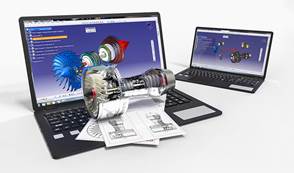
Here we focus on CAD (Computer Aided Design) software. The software can be highly specific, it is designed to be a technical tool with functions in industrial design, mechanical design, architecture, and areas such as aerospace engineering and astronautics. A CAD model will contain data like material properties, dimensions, tolerance and manufacturing process specific information. Furthermore, many CAD applications now offer advanced rendering and animation capabilities to better visualise product design.
If you choose to create a 3D printable model with CAD you can save your model in the stereolithography file format (STL), a de facto CAD file format for additive manufacturing (other file formats tailored specifically for AM exist too).

The List: Top 10 From Beginner to Professional Level


1. TinkerCAD

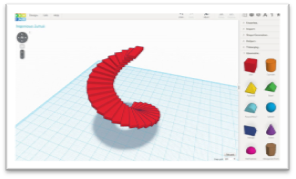
This is an online 3D design app geared towards complete beginners coming from Autodesk. The software features an intuitive block-building concept, allowing you to develop models from a set of basic shapes. The online software comes with a library of millions of files that users can use to find shapes that suit them best and manipulate them as they wish. It also has a direct interaction with third party printing services. It is quite a simplistic program and will have limitations for some designs. However, it is aimed mostly at people with no experience whatsoever with 3D modelling.
https://www.3dnatives.com/en/wp-content/uploads/sites/2/tinkerCAD.jpg
– Beginner Level
– Free

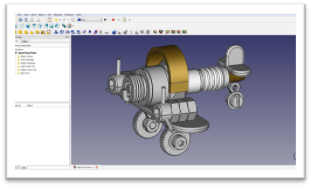
2. FreeCAD

FreeCAD is a completely free parametric 3D modeling tool that is open-source and enables you to design real-life objects of any size. The parametric component makes editing easier. You can go to your model’s history and change the parameters to get a different model. This software is not designed for professional purposes but is a good training tool. The options it offers are quite basic but a good starting point when you have no experience.
https://www.3dnatives.com/en/wp-content/uploads/sites/2/FreeCAD.jpg
 Beginner Level
– Free

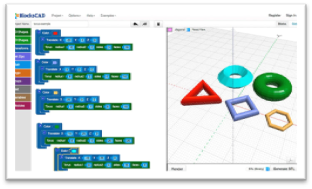
3. BlocksCAD

This 3D software is specifically created for educational purposes, its development is done so that anyone can later use OpenSCAD, a more professional CAD software. The commands for the development of the objects and their transformations are represented by colour blocks, reminiscent of the well-known construction toys, LEGO. BlocksCAD’s code is fully compatible with OpenSCAD’s so you can give your models the last touch up on there. Export formats can be OpenSCAD or STL. To make sure that anyone can learn to use the software, BlocksCAD has a Youtube channel with different tutorials on 3D modeling.
https://www.3dnatives.com/en/wp-content/uploads/sites/2/CADSoftwares_Blockscad.jpg
– Beginner Level
– Free

4. Creo

Creo CAD software is one of the market leaders in product design, developed by Parametric Technology Corporation more than 30 years ago. It integrates many functionalities such as thermal, structural, motion, parametric and freestyle surface generation and direct modeling. It is a complete tool, ideal for additive manufacturing, that will allow you to perform all your dimensioning calculations while modelling your final idea. The latest Creo 5.0 version was released in 2018 and features an improved user interface, redesigned for a better handling. A 30-day trial version is available free of charge.
https://www.3dnatives.com/en/wp-content/uploads/sites/2/creo.jpg
 Intermediate Level
– One license is $2,310

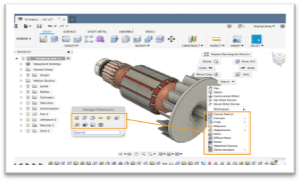
5. Fusion 360°

Fusion 360 is a cloud-based 3D CAD program. It’s unique in the sense that it uses the power of the could to bring together design teams to collaborate on complex projects. An advantage of the Fusion 360° platform is it stores the entire history of the model including all the changes. It contains numerous design options, including freeform, solid and mesh modeling. It operates on a monthly payment subscription basis. The developers also regularly update the features, making it better as new instalments come along. It runs on multiple platforms and allows users to access their information wherever they want. In i.materialise’s poll in 2017, they noticed a jump in the program’s popularity in the last two years. Many people have praised the software’s professional capabilities and user-friendly interface and workflow.
https://www.3dnatives.com/en/wp-content/uploads/sites/2/fusion.jpg
– Intermediate Level
– Payment: $60/month or $495/year
– Free for students, educators & academic institutions

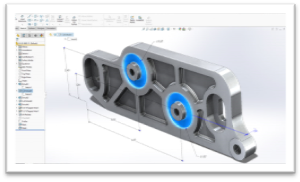
6. Solidworks

Published by Dassault Systèmes, it is often used by professional 3D designers. It is a parametric featured-based model. The software includes a wide range of features such as design validation tools, or reverse engineering. It tends to be used for industrial objects. It is quite practical and detailed. One of its special features is that unlike many other software that mimic curves through gently inclining flat structures, Solidworks uses a system of NURBS. This system allows to create very detailed curvatures. Also, instead of polygonal modeling, it uses dimensional sketching so that resizing becomes far less of a hassle. One disadvantage that is often brought up by users of the software is the limited ability to import .STL files. If you wish to download and edit .STL files, a secondary program will most likely be necessary. The file format is very much an output file format and not intended for post-design processing.
https://www.3dnatives.com/en/wp-content/uploads/sites/2/solidworks.jpg
– Professional Level
– One license is $3,995

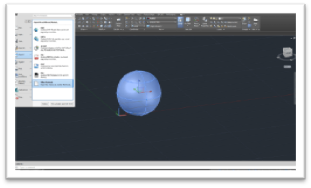
7. AutoCAD

AutoCAD software from Autodesk was one of the first CAD software to be released on the market in 1982, making it a very established CAD software across industries. Even though AutoCAD is popular and widely used, in the 3D printing community its popularity has decreased lately according toi.materialise’s poll. Many users cite that although it is ideal for 2D drafting, it is not the easiest to use for 3D modeling. Indeed, the learning curve to master macros and scripts is steep for moving beyond simple parts. The software is aimed at professionals with experience in programming models algorithmically. If you have that skill, there is little you can’t do with AutoCAD. The 3D models can readily be converted to STL files for 3D printing. Since 2010, AutoCAD was released on a mobile and web-app as well, called AutoCAD 360.
https://www.3dnatives.com/en/wp-content/uploads/sites/2/autocad.png
– Professional Level
– From $185/month or $1,470/year
– Free and fully functional version to download for students and faculties.

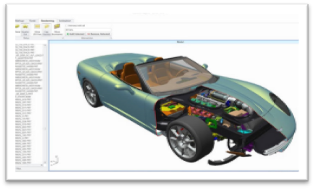
8. CATIA

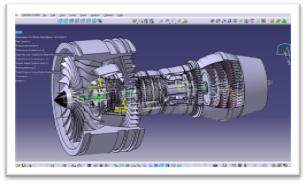
The CATIA CAD solution has historically been developed for Dassault Aviation’s own needs. It is more than a simple CAD Software, as it is also a multi-platform software suite for CAD, CAM (Computer Aided Manufacturing), CAE (Computer Aided Engineering) and more. It is powered by Dassault Systèmes’ 3DEXPERIENCE platform.  CATIA innovates product design and experience by integrating various approaches in product design and development, enabling multiple disciplines to leverage their existing tools throughout the stages of product development process. Therefore, the software is very useful for industrial and creative designers, mechanical engineers, and systems architects. CATIA provides a 3D design environment that enables online people and stakeholders to share product designs and collaborate on product modeling.
https://www.3dnatives.com/en/wp-content/uploads/sites/2/CATIA.jpg
– Professional Level 
– Starting price around $10,000 

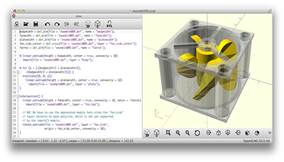
9. OpenSCAD

OpenSCAD is a free, open-source CAD software aimed at making solid 3D models. It is suitable for experienced users seeking a platform for an elaborated project. Also, given its Constructive Solid Geometry (CSG) and the Extrusion of 2D outlines, this software is intuitive for coders/programmers. It is great for simple shapes that are already parametrically defined. Since it is completely based on description language, the program will not be intuitive for everyone at all.
openSCAD
– Professional Level
– Free 

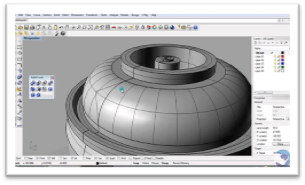
10. Rhino

The company behind this software markets it as the world’s most versatile 3D-modeler. It is a commercial 3D computer graphics and CAD software. The program uses a precise and mathematical model known as NURB which allows to manipulate points, curves, meshes, surfaces, solids and more in all sorts of ways. Rhino3D’s strong point is its wide range of design features. It offers great versatility in creating complex 3D models. Many users have reported however that the software is difficult to learn and will take a lot of practice to master. It is also reportedly not the most accurate software at capturing user intent. The software is available for download in a variety of bundles on their website at various prices.
https://www.3dnatives.com/en/wp-content/uploads/sites/2/rhino3d.jpg
– Professional Level
– Includes different bundles; Rhino 6.0 starts at 995€ for Windows and Rhino 5.0 at 695€ for Mac

Powered by Blogger.